Navigation Collection Images
The images that you define for your navigation collections are published and displayed on navigation collection pages. You can associate images with navigation collections themselves, as well as with navigation collection folders and content references. You can define these images at the system, registry, source, and individual navigation collection levels.
The following navigation collection illustrates the different ways in which images can be used:
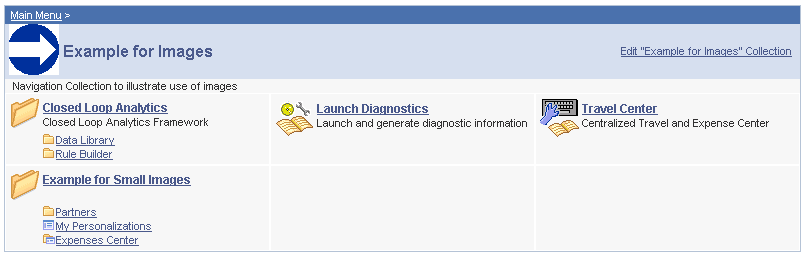
In the sample navigation collection, suppose that the following images have been defined for the different image types:
| Term | Definition |
|---|---|
|
|
This image was defined as the collection image for this specific navigation collection. |
|
|
This image was defined as the default large folder image on the System Options page, and was not overridden at the source reference, registry, or navigation collection level. Large folder images appear for folders at the top level of a navigation collection publication. |
|
|
This image was defined as the content image in the navigation collection definition. Large content images appear for content references at the top level of a navigation collection publication. |
|
|
This image represents a navigation collection that was added to this navigation collection. This image was selected as the collection image in the referenced navigation collection definition, and was not overridden in this navigation collection definition. Large collection images appear for navigation collections at the top level of a navigation collection publication. |
|
|
This image was defined as the small folder image. Small folder images appear for folders nested within top-level folders on a navigation collection publication. |
|
|
This image was defined as the small content image. Small content images appear for content references nested within top-level folders of a navigation collection publication. |
|
|
This image was defined as the small collection image. Small collection images appear for navigation collections nested within top-level folders of a navigation collection publication. |


While large (parent) images can be set at the system or registry default levels and overridden with unique images defined at the source reference or navigation collection levels, small (child) images can be defined only at the system and registry default levels. This means that a small image displayed on navigation collection publications will always be the default small image defined at the system or registry level.
If the navigation collection content, folder, or navigation collection reference for which a small image is displayed has a unique image defined at the source reference or navigation collection level, this unique large image does not appear until the element is accessed as a top-level or parent-level element on a navigation collection page.
For example, while the Expenses Center is displayed with its default small image, when you access the Example for Small Images navigation page, the Expenses Center appears with its unique large image.