Pagelet Sizes
The homepage layout can vary based on end-user personalization. These two layout choices are available for homepages and dashboard pages:
-
The three-column layout divides the homepage into three equally-sized columns. In PeopleSoft applications, these are called narrow columns.
-
The two-column layout divides the homepage into two differently-sized columns: one narrow column and one wide column, which is twice the width of the narrow column.
Because pagelets must function in two possible homepage layouts, it is column size that drives pagelet size. This fact is evident in the three categories of pagelet widths that are listed here:
-
Narrow pagelets.
-
Wide pagelets.
-
Banner pagelets.
Narrow Pagelets
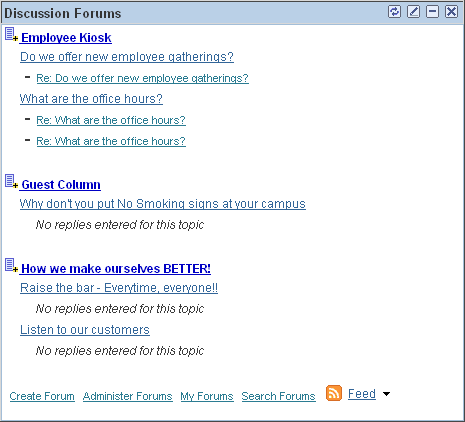
With three-column layout, all pagelets are rendered as narrow pagelets. Narrow pagelets are designed to be approximately 300 pixels wide. Subtracting the border and the internal margin leaves 285 pixels for the content. A narrow pagelet appears in a column that is one-third the width of the portal homepage. Because the pagelet is narrow, you should provide a succinct list of values that users can quickly traverse. Select the minimum set of data that best encapsulate the pagelet content. A narrow pagelet typically accommodates a single 30-character field.
A pagelet that has been designed to fit in a narrow column can be rendered in a wide column as well. However, user interface issues can occur when a pagelet that has been designed to render in a wide column only is rendered in a narrow column. Therefore, a pagelet should always be able to operate in a narrow format.
This example shows the Discussion Forums pagelet as a narrow pagelet. The essential links and information are displayed in the narrow format.
Generally, all pagelets should be developed with the narrow column size as the default. However, a pagelet can be designed to take advantage of the additional space when it is rendered in a wide column.
Wide Pagelets
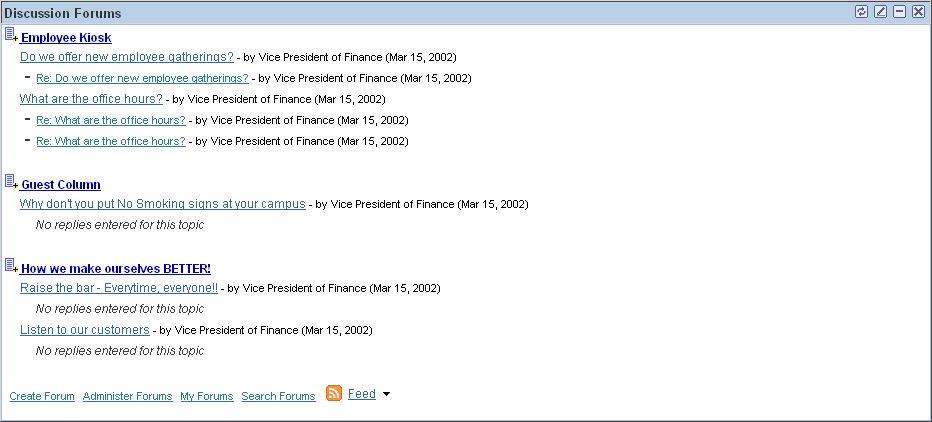
With two-column layout, the first column allows spacing for a narrow pagelet and the second column allows spacing for a wide pagelet. Wide pagelets are designed to span two-thirds of the width of the homepage. Subtracting the border and the internal margin leaves 650 pixels for the content. Although you can fit more data on the pagelet, the data must remain meaningful.
This example shows the Discussion Forums pagelet as a wid pagelet. In addition to the essential links and information that are also displayed in the narrow format, the wide format includes who posted a discussion topic or reply and when.
When the layout contains the wide column, the PORTALPARAM_COMPWIDTH query string parameter is set to wide and passed to the HTML denote the wide version. Developing a wide version of a pagelet is optional.
The PORTALPARAM_COMPWIDTH Parameter
The parameter PORTALPARAM_COMPWIDTH can contain the value Wide or Narrow and
can be used to specify whether a pagelet is being rendered in a narrow
or wide column. The function pgltAtion does not check or use this parameter, the narrow pagelet will just
be rendered in a wider area.
This sample PeopleCode
references the query string parameter PORTALPARAM_COMPWIDTH:
Component string &CompWidth;

&CompWidth = %Request.GetParameter("PORTALPARAM_COMPWIDTH");

If &CompWidth = "Wide" Then;
		TransferPage(Page.PT_CONTRK_PGLT_W);
End-If;
Banner Pagelets
Banner pagelets are the widest of all pagelets. Banner pagelets extend across the entire width of the homepage or dashboard page and span all columns regardless of layout. Both the two-column and three-column layouts enable you to add one banner pagelet that is positioned at the top of the page. Banner pagelets are designed to be 1240 pixels wide.
Note:
The actual number of pixels that are available for content varies based on the resolution of your display and the rendering engine of your browser.
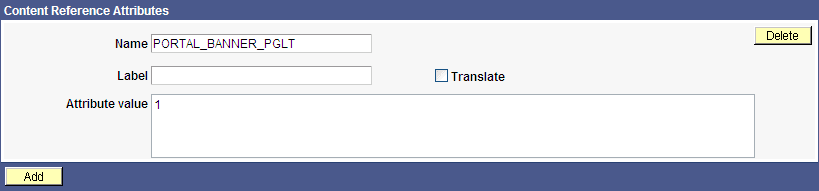
The portal uses the content reference attribute, PORTAL_BANNER_PGLT to appropriately position banner pagelets. You must manually enter this attribute name and its accompanying value.
This example shows the entry for the PORTAL_BANNER_PGLT content reference attribute:
Important:
Homepages and dashboard pages can display one banner pagelet only. If more than one pagelet on a homepage includes the PORTAL_BANNER_PGLT attribute, the system recognizes the attribute for the first pagelet and ignores the attribute for any other pagelets.
Pagelet Extensions
Pagelet extensions are standard pages. They can be registered with a template that allows it to use the entire width of the browser with no side frame for navigation, or with a template that includes a side frame.
In the former case, no inherent sizing requirements are imposed. PeopleSoft pages are designed for browsers running with a resolution of at least 1280 x 1024. Therefore, when a side frame is not included, a pagelet extension should not be wider than 1190 pixels, accounting for borders and so forth.
In the latter case, a pagelet extension should not be wider than 375 pixels.