Pagelet Development Tools
You can create a pagelet using several ways. Ultimately, the portal servlet assembles HTML, so the key is determining how to generate the HTML. Some methods leverage PeopleTools, while other options allow pagelet creation without PeopleTools.
One set of options is to develop pagelets with PeopleTools. This is the most straightforward approach if you are dealing solely with data from PeopleSoft applications. The two types of PeopleTools-based pagelets are:
-
PeopleSoft pages.
PeopleTools dynamically generates the appropriate HTML to render the page data based on the definitions created within PeopleSoft Application Designer. This is the most straightforward approach when the data being rendered is in a PeopleSoft application database.
-
iScripts.
You can write a PeopleCode function that renders HTML using %Request and %Response objects, which are similar to ASP or JSP programs. This allows more control over data retrieved and enables you to conditionally render HTML. This approach gives you maximum flexibility, but unlike the PeopleSoft Pure Internet Architecture page approach, you must code for things such as multi-language and browser support.
The focus of this document is a set of options that can be used to create a pagelet application with one of the many technologies that generate HTML. This may be the approach you take if you’re integrating a non-PeopleSoft system with the PeopleSoft Interaction Hub. For example, you’re applying business logic to data from a non-PeopleSoft system, or you might be combining data from a PeopleSoft application with other systems.
The pagelet can be written in a variety of technologies, including:
-
Adobe ColdFusion.
-
AJAX.
-
ASP.
-
CGI.
-
HTML.
-
Internet server API (ISAPI).
-
JavaScript.
-
JSP.
-
Perl.
-
Servlets.
-
Tool Command Language (Tcl).
The following diagram illustrates some of the ways that you develop in a PeopleSoft environment using technology other than PeopleTools:
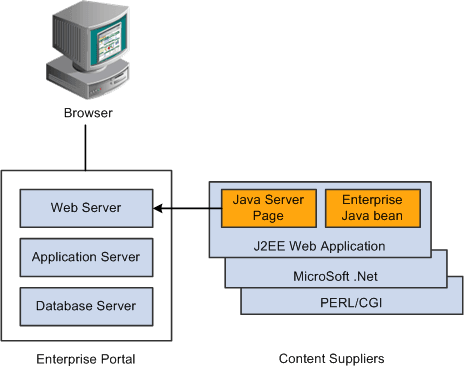
You can convert your own HTML into a pagelet in several ways:
-
Pagelet Wizard.
Pagelet Wizard walks you through a series of steps involved in creating and publishing a pagelet. Portal administrators and nontechnical users can integrate and transform data from a wide variety of data sources, both internal and external to PeopleSoft applications.
External sources include web applications that can be referenced with a URL, HTML block (such as a form or table), and Java classes. You do not need to have PeopleSoft-specific application development tools or skills to be able to create pagelets.
-
Registered URL.
You can also choose to register a URL, such as a JSP or ASP, directly in the portal registry.