Reviewing Pagelet Wizard Pagelet Details
Access the Review Pagelets page. (Select .)
This example illustrates the fields and controls on the Review Pagelets page. You can find definitions for the fields and controls later on this page.
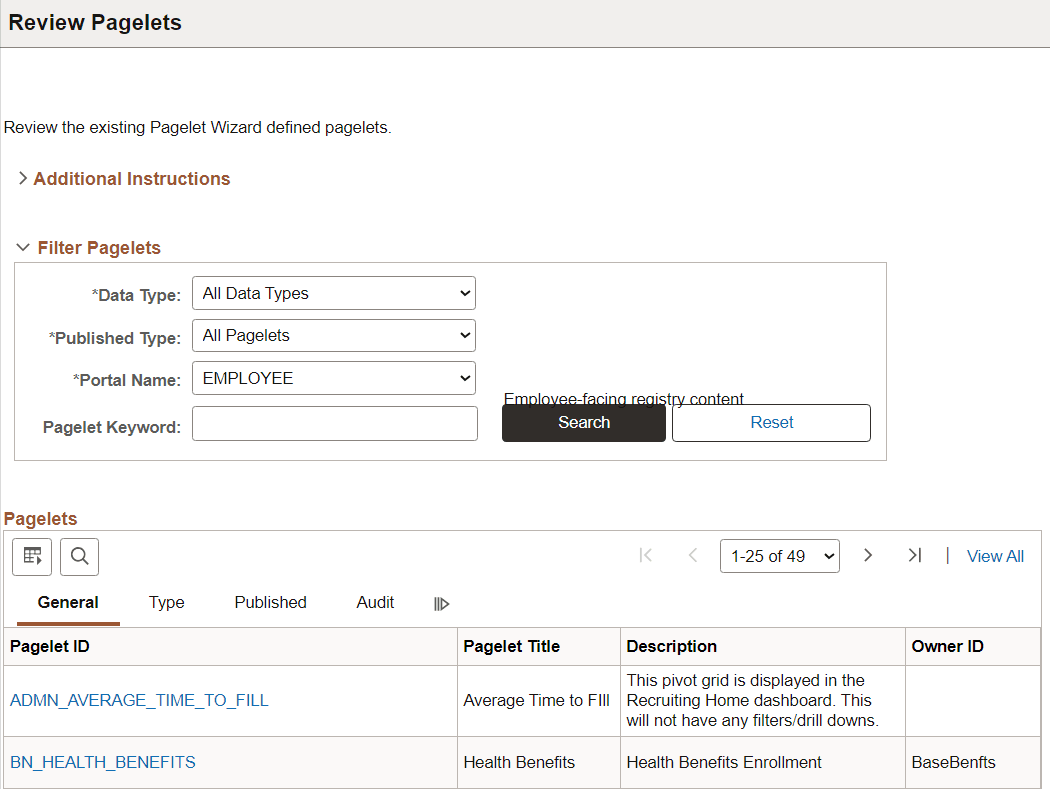
On any of the tabs for this component, you can click the Pagelet ID link to open Pagelet Wizard and the definition of the pagelet.
General Pagelet Information
Click the Pagelet ID link to open Pagelet Wizard and the definition of the pagelet.
Pagelet Type Information
| Field or Control | Description |
|---|---|
|
Category |
Displays the category ID from step 1 of Pagelet Wizard. |
|
Data Type |
Displays the pagelet data type. |
|
Display Format ID |
Displays the format ID of the pagelet. |
Pagelet Publishing Information
| Field or Control | Description |
|---|---|
|
Homepage |
If selected, indicates that the pagelet has been published as a homepage page. |
|
Template |
If selected, indicates that the pagelet has been published as a template pagelet. |
|
WSRP |
If selected, indicates that the pagelet has been published as a WSRP portlet. |
|
Embeddable |
If selected, indicates that the pagelet has been published as an embeddable pagelet. |
|
Cache |
Displays a check box if caching is enabled for this pagelet. |
|
Time |
Displays the time the pagelet is held in the cache. |
Pagelet Audit Information
This tab includes the timestamp and user ID of the person who created the pagelet as well as information about any updates to the pagelet.