Running the Clean Portal Project Process
Access the Clean Portal Project page. (Select .)
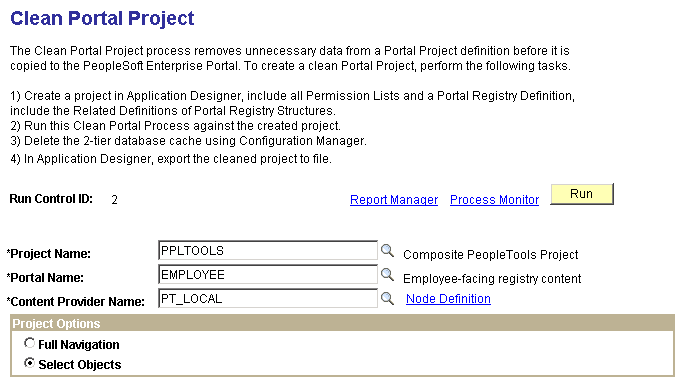
This example illustrates the fields and controls on the Clean Portal Project page. You can find definitions for the fields and controls later on this page.
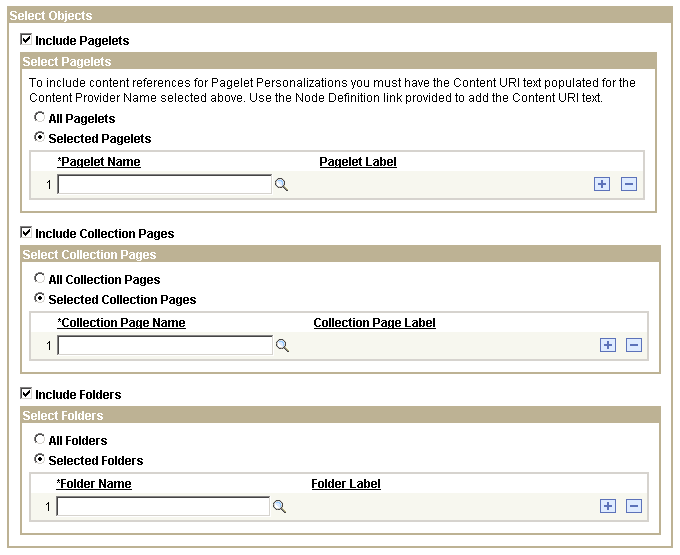
This example illustrates the fields and controls on the Select Objects group box of the Clean Portal Project page. You can find definitions for the fields and controls later on this page.
| Field or Control | Description |
|---|---|
|
Project Name |
Select the portal project that you want to clean for export into the PeopleSoft Interaction Hub. Projects available for selection are those in the database that contain at least one registry structure. |
|
Portal Name |
Select the portal that contains the registry structures that you want to copy. Available portal names are derived from the portal project that you selected, as well as from the project data that contains the portal name of the registry structures. |
|
Content Provider Name |
Select the content provider node name of the registry structure that you want to include in your portal project. Available node names are derived from the portal project that you selected. |
|
Node Definition |
Select to access the Node Definitions - Portal page. If you select the Include Pagelets option, you must have a URL value in the node definition to enable the Clean Portal Project process to correctly include personalization pages for the pagelets that you copy over to the PeopleSoft Interaction Hub. Access the Node Definitions - Portal page to enter the content URI text for the content provider node name selected on this page. When you click this link, you are prompted to save or cancel any changes that you made in the component, and you are then transferred to the Node Definitions - Portal page. |
Project Options
| Field or Control | Description |
|---|---|
|
Full Navigation |
Select to run the Clean Portal Project process on all objects in the portal project. |
|
Select Objects |
Select to run the Clean Portal Project process on select objects in the portal project. When you select this option, the Select Objects group box appears, enabling you to select the type of navigation that you want to include in your portal project. Use this option if you don't want to copy and maintain the full content provider navigation structure. |
Select Objects
| Field or Control | Description |
|---|---|
|
Include Pagelets |
Select to include pagelets (including navigation collection pagelets) in the portal project in the run of the Clean Portal Project process. When you select this option, the Select Pagelets group box appears, enabling you to specify which pagelets you want to be processed. The actual published navigation collection pagelet content references are included for copying to the PeopleSoft Interaction Hub. The navigation collection definitions are not included. Pagelet personalization pages are included in the portal project if the content provider node name contains the correct URL. Click the Node Definition link to access the Node Definitions - Portal page, where you can enter this URL. |
|
Include Collection Pages |
Select to include navigation collection pages in the portal project in the run of the Clean Portal Project process. When you select this option, the Select Collection Pages group box appears, enabling you to specify which navigation collection pages you want to be processed. The actual published navigation collection pages are included for copying to the PeopleSoft Interaction Hub. The navigation collection definitions are not included. |
|
Include Folders |
Select to include folders in the portal project in the run of the Clean Portal Project process. When you select this option, the Select Folders group box appears, enabling you to specify which folders you want to be processed. Selecting a folder for inclusion in the process also includes all of its children and parents for copying into the PeopleSoft Interaction Hub. |
Select Pagelets
| Field or Control | Description |
|---|---|
|
All Pagelets |
Select to include all pagelets in the portal project in the run of the Clean Portal Project process. |
|
Selected Pagelets |
Select to include only selected pagelets in the portal project in the run of the Clean Portal Project process. Selecting this option displays the Pagelet Name field, enabling you to select specific pagelets that you want to be processed. |
Select Collection Pages
| Field or Control | Description |
|---|---|
|
All Collection Pages |
Select to include all published navigation collection pages in the portal project in the run of the Clean Portal Project process. |
|
Selected Collection Pages |
Select to include only selected published navigation collection pages in the portal project in the run of the Clean Portal Project process. Selecting this option displays the Collection Page Name field, enabling you to select specific published navigation collection pages that you want to be processed. |
Select Folders
| Field or Control | Description |
|---|---|
|
All Folders |
Select to include all folders in the portal project in the run of the Clean Portal Project process. |
|
Selected Folders |
Select to include only selected folders in the portal project in the run of the Clean Portal Project process. Selecting this option displays the Folder Name field, enabling you to select specific folders that you want to be processed. |