Specifying Search Record Data Source Parameters
After selecting Search Record as the data type on the Select Data Source page, access the Specify Data Source Parameters page. (Select On the Select Data Source page, click the Next button.)
This example illustrates the fields and controls on the Specify Data Source Parameters for a search record data source. You can find definitions for the fields and controls later on this page.
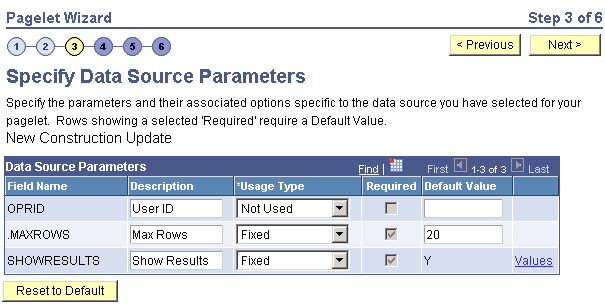
Data Source Parameters
Pagelet Wizard analyzes the selected search record and retrieves a list of search keys required for the search record. You cannot add to the list of data source parameters.
For fields that are search keys but that are not displayed on the search prompt page or in the result set for the search record (for example, the SETID and BUSINESS_UNIT fields), Pagelet Wizard assimilates the PeopleTools behavior and does not display the keys during design or at runtime. It simply binds in the same values that PeopleTools would use. These values are derived from the default field values established by the user in the PSRECDEFN table.
| Field or Control | Description |
|---|---|
|
Field Name |
Displays the data source parameters that correspond to the search keys required for the search record. This field also displays the required system-supplied .MAXROWS and SHOWRESULTS search record data source parameters. Use the .MAXROWS field to limit the amount of data returned to the pagelet. Use the SHOWRESULTS field to determine whether search results appear on the pagelet. If this field value is set to Y, search record results appear directly on the pagelet with links to transaction data. In addition, if this field value is set to Y, the search results grid displays results based on the supplied data source parameter default key field values. If no defaults are supplied, all results appear, up to the .MAXROWS value defined for the pagelet. If this field value is set to N, the pagelet displays a search prompt for the selected search record. The Search By drop-down list box values that are available on the pagelet are the search keys for the search record. If data source parameter default key field values have been defined, then when the pagelet is initially accessed, the default value appears in the begins with pagelet field. |
|
Required |
This option is selected if the data source parameter must have a value entered on the pagelet to retrieve data successfully. For example, the .MAXROWS and SHOWRESULTS fields are required. If this option is selected and display-only, the value is set in the application class at the API level. Search key values are not required because the search record pagelet supports partially populated keys so that you can define the pagelet to return all possible results. If you leave this option deselected, the data source parameter value can be omitted at runtime, or the value can be provided to refine the data selection criteria. |
|
Reset to Default |
Click to reset the values on this page to the default values specified by the search record data source API. |
|
Values |
Click the Values link to set the default values for users. |
Personalization Instructions
Use the Personalization Instructions text box to enter custom personalization instructions for the pagelet. These personalization instructions appear on the Personalization page of the pagelet.
Note:
Personalization instructions must be translatable.