Specifying URL Data Source Parameters
After selecting URL as the data type on the Select Data Source page, access the Specify Data Source Parameters page. (Select On the Select Data Source page, click the Next button.)
This example illustrates the fields and controls on the Specify Data Source Parameters page for a URL data source. You can find definitions for the fields and controls later on this page.
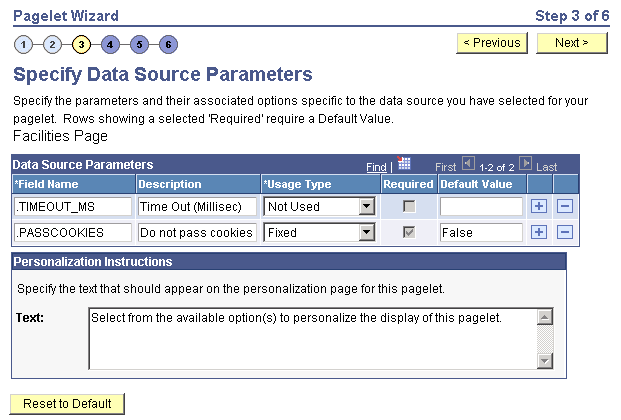
The data source parameters that you can define on this page correspond to URL query parameters, such as an HTTP GET request.
An HTTP GET request is a URL type for which parameters are placed on the query string separated by ? and &, such as http://search.yahoo.com/search?p=searchterm.
For example, the Yahoo! search page URL takes the form http://search.yahoo.com/search?p=searchterm. If you want to make searchterm a user-specified data parameter, enter a URL field value of http://search.yahoo.com/search in step 2 on the Select Data Source page. In step 3 on this page, add a data source parameter Field Name value of p and set its Usage Type field value to User Specified with a default value. Pagelet Wizard then adds the ?p=searchterm value, with the searchterm value able to be personalized by the user, to the URL before it retrieves the content to the pagelet.
You can specify a parameter for the number of milliseconds that a data source will wait for a response before timing out on the homepage. When you set .timeout_ms, you can then enter the number of milliseconds that the system will wait.
Passing Cookies
When the URL request is in the AuthenticationToken domain, then the URL data source will pass all cookies on the request to retrieve the content. (The only exception to this rule is if the request is being made back to the local web server. In that instance, only the PS_TOKEN cookie will be passed.) Any requests to servers outside of the AuthTokenDomain will not have any cookies passed.
To turn off the passing of cookies other than PS_TOKEN, add the parameter .passcookies as a Fixed usage type with a default value of False. Adding this parameter with a value of False will instruct pagelet wizard to pass only the PS_TOKEN cookie (and no other cookies) for requests within the AuthenticationToken domain. Adding the .passcookies parameter with a value of True is not recommended because this is the same as the default behavior.
Note:
Make sure to examine any security impact that passing cookies might present in your configuration before setting this parameter.
Personalization Instructions
Use the Personalization Instructions text box to enter custom personalization instructions for the pagelet. These personalization instructions appear on the Personalization page of the pagelet.
Note:
Personalization instructions must be translatable.