Step 2: Data Source Information - Application Class
Use the Data Source Information page for the Application Class data type to specify which application class data source.
Navigation:
-
On the Tile Basic Information page, click the Next button.
-
Select the Application Class data type.
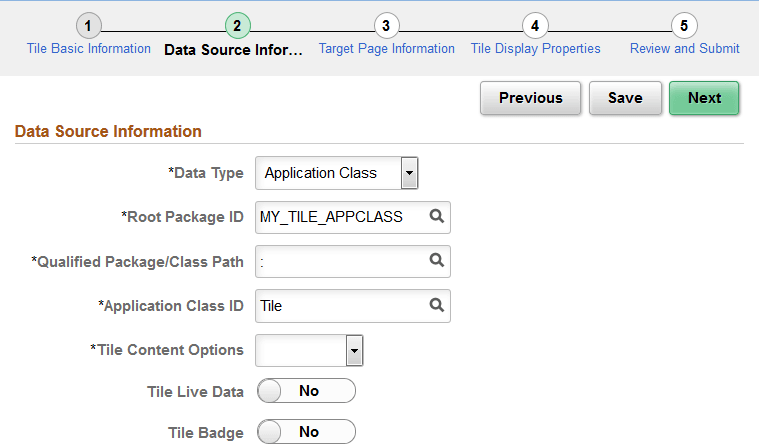
This example illustrates the fields and controls on the Data Source Information page for the Application Class data type. You can find definitions for the fields and controls later on this page.
| Field or Control | Description |
|---|---|
|
Root Package ID |
Select a custom application package that includes the class that implements the PTGP_APPCLASS_TILE:Tiles:Tile base class and one of its required SetTileContentAs methods. |
|
Qualified Package/Class Path |
Select the package name or package path to the implemented class. |
|
Application Class ID |
Select the class that implements the required getTileLiveData method. |
|
Tile Content Options |
Select the tile content type:
Note: This setting can be overridden in the getTileLiveData method. |
|
Tile Live Data |
Select this option to indicate whether the tile displays the live data region. Note: This setting can be overridden in the getTileLiveData method. |
|
Tile Badge |
Select this option to indicate whether the tile displays the badge region. Note: This setting can be overridden in the getTileLiveData method. |