Tile List Page
Use the Tile List page to review, edit, or delete existing tile definitions that have been created with Tile Wizard.
Note:
While the tile repository may contain additional tile definitions, only those created through Tile Wizard are listed here.
Navigation:
This example illustrates the fields and controls on the Tile List page. You can find definitions for the fields and controls later on this page.
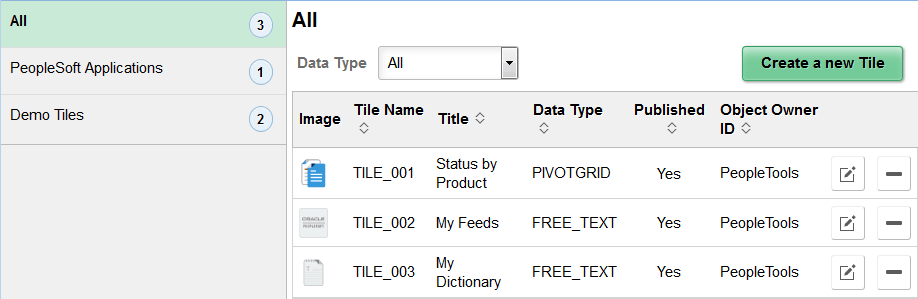
Use the categories in the left panel to filter the tiles displayed in the tile list.
Note:
The left panel is collapsible depending on the width of the device used to access the page.
| Field or Control | Description |
|---|---|
|
Data Type |
Select a data type to filter the tiles displayed in the tile list. |
|
Create a new Tile |
Click this button to create access Tile Wizard to create a new tile definition. |
|
Edit |
Click the Edit button to edit an existing tile definition. Note: Alternatively, click anywhere in the row (except on the Delete button) to edit an existing definition. |
|
Delete |
Click the Delete button to delete an existing tile definition. |
|
Add to Project |
Click the Add to Project button to access the Add To Project page to insert one or more tile definitions into an ADS project. See Lifecycle Management Guide: Adding Data Set Instances from Object Designer Pages for more information. |