Understanding Creation and Maintenance of Action Items
Action items are the tasks that are assigned for completion within an activity guide. As an application developer, you will refer to these as action items. To users, they are presented as tasks or steps.
Note:
The horizontal optimized guided sequential template type supports a simple structure with one level of action items only; summary/detail action items are not supported by this type.
Action items can be linked to specific local or remote components, PeopleSoft queries, PeopleCode programs (an application class or an iScript), self-service process definitions, or external URLs. Within an activity guide, action items are organized into an ordered list; however, in many simple activity guides, action items can be completed in a non-sequential order. Action items can be organized hierarchically with a parent (summary) action item composed of child (detail) action items. Furthermore, an action item can be set to be dependent on the status of another action item.
Typically, action items are created and maintained at the activity guide template level only. However, you can also create action items within activity guide instances; the same pages with the same fields are used in both cases. Once an activity guide instance is created, updates to the action items themselves would occur programmatically or through actions of the user rather than through these administrative pages. While the examples in this section illustrate creating and maintaining action items within an activity guide template, these examples could apply equally to activity guide instances.
Sequence Numbers
You must designate a sequence number for each action item, which determines its order within its designated level—that is, at the root level or as a detail action item beneath a summary item. In addition, if you want to make an action dependent on another action item, that action item must be a predecessor—that is, it must have a lower sequence number than the dependent action item. Each sequence number must be unique within an activity guide template or instance.
While sequence numbers define the order in which action items are presented to a user, they do not in and of themselves dictate that tasks be completed in sequence. Additional attributes, such as dependencies, must be defined to ensure that tasks be completed in a specific sequence when that is required. Therefore, the simplest activity guide definitions allow for non-sequential completion of tasks.
Note:
Activity guides support a two-level hierarchy only—that is, only one level of detail is supported beneath a summary action item.
With a little planning, you can specify action item sequence numbers that clearly specify the order of tasks and that allow modifications to the list at a latter date—for example, to add or delete action items. Oracle recommends that you specify initial sequence numbers in units of 10 to permit insertion of new action items into an existing sequence. For example, for a simple activity guide with no summary action items, the initial sequence would be:
10, 20, 30, 40 ...If your activity guide contains summary as well as detail items, then increment the root-level items by 100 instead of by 10. For example:
100 - Summary item 1
  110, 120, 130, 140, ...
200
300
400 - Summary item 2
  410, 420, 430, 440, ...
500
Designating the initial sequence numbers in this manner will allow you to easily convert an existing root-level action item into a summary item without having to renumber the rest of the sequence.
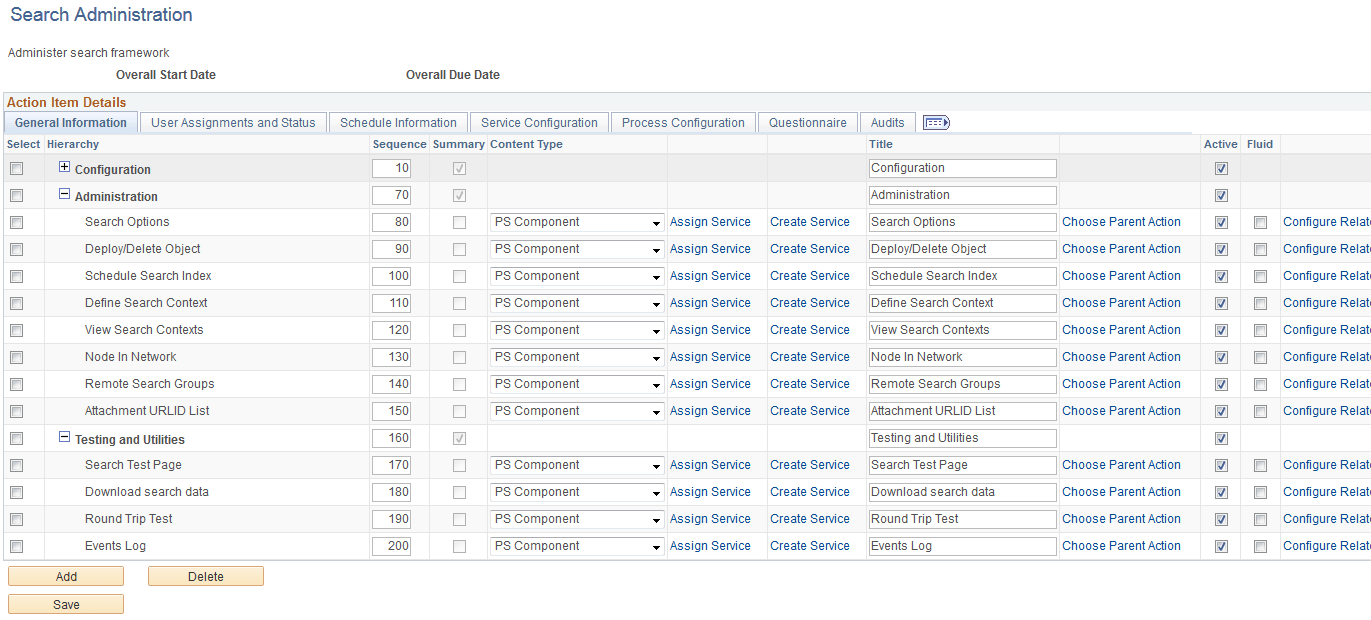
The following example shows sequence numbers for summary and detail action items. In this list, Configuration (10, also collapsed), Administration (70), and Testing and Utilities (160) are parent, or summary, items: