Understanding Navigation Collections
Navigation collections provide a flexible tool for building alternative groupings of the contents stored in your portal registry. These alternative groupings of links to portal content can then be deployed to different users or groups of users, creating navigation that specifically addresses your users' business needs.
The links in navigation collections provide an alternate method of accessing content in the portal registry. A navigation collection is a published compilation of these links. A link in a navigation collection is a pointer to a content reference or folder reference in the portal registry; however, it does not store the contents of the content reference or folder reference. Navigation collection links store only the references needed to construct a URL at runtime to redirect output to the original content reference or folder reference. These references include the portal link, folder reference link, or content reference link.
When you define and save a navigation collection, the system automatically stores it in the hidden Navigation Collections folder under Portal Objects in the portal registry.
After being defined, a navigation collection can be published as a custom navigation page or as a navigation pagelet for use on a homepage, dashboard page, or WorkCenter page. In addition, navigation collections can be accessed through a tile that has been defined to display the navigation collection and links in an activity guide.
When you publish navigation collections, you can choose to publish navigation collections as public content. If you do not choose to provide public access to a navigation collection, you can choose one of these two options for setting security access to published navigation collections:
-
A security synchronization process that will apply content reference and folder security as it is defined in the portal registry to the content reference definition for published navigation pages or pagelets.
-
A manual process that entails you configuring the security access to published navigation pages and pagelets.
Note:
Public access is allowed by default.
Navigation collections enable you to distribute the creation and maintenance of collections to subject matter experts in your organization, such as functional administrators and business analysts. The subject matter experts creating navigation collections should understand the content that their user communities need to access on a frequent basis. They should also know where to find links to this content, and whether the content is accessed by portal navigation or external URLs.
Navigation collections can contain these elements:
-
Links to existing, visible content references in the portal registry.
-
Links to existing, visible folders in the portal registry.
The navigation collection will contain all contents of the menu folder and its subfolders.
-
Links to remote, component-based content references.
Note:
Remote links are supported only on portal systems with unified navigation configured to include the remote content provider system.
-
Custom (user-defined) folders that can be used to group combinations of any of these elements, including other user-defined folders.
Navigation Collection Published as a Navigation Page
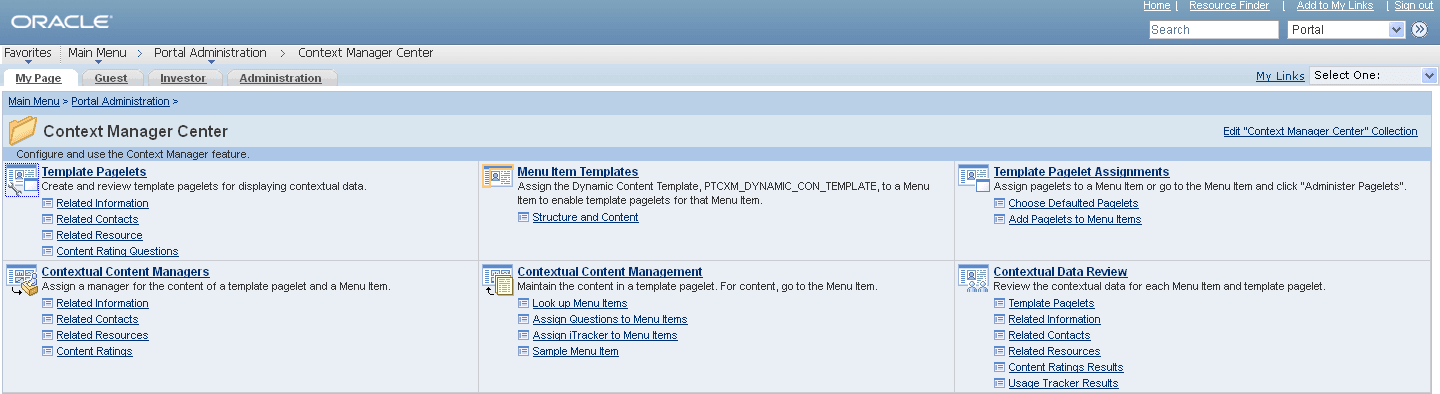
The following example shows a navigation collection that is published as a custom navigation page:
Important:
Standard navigation pages (DFANs), custom navigation pages (CFANs), SmartNavigation, and other forms of classic navigation are no longer supported. The default navigational interface for PeopleSoft applications in the current release is based on the fluid banner, which can be used for both classic and fluid applications. For information on working with the fluid user interface, see Applications User’s Guide: Working with Fluid Pages and Controls. However, navigation collections published as pagelets and used on classic WorkCenters, but not on classic homepages, remain a supported navigation mechanism.
Top-level folders in the navigation collection appear as bold and linked section headings that organize the folders and content references they contain, as shown in these examples. However, the appearance of your published navigation collections depends on the assigned style sheet. The assigned style sheet must use style classes contained in the PTPP_SCSTYLEDEF style class definition.
Click any folder link to access another navigation page that contains any folders and content references nested in the parent folder.
Note:
Click the Edit <collection name> Collection link in the upper right corner of the navigation page to access the navigation collection definition on the Maintain Collection page. This link appears only for users who can access the navigation collection definition component.
Navigation Collection Published as a Navigation Pagelet
The following example shows a navigation collection that is published as a navigation pagelet:
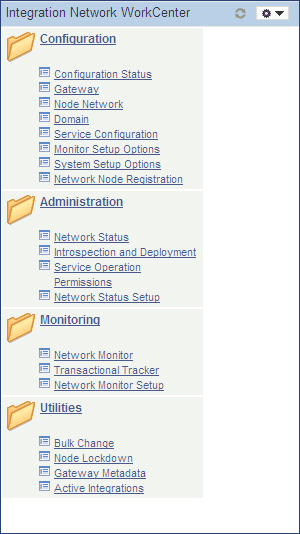
Folders and content references work in much the same way as they do for the published navigation page.