Understanding Participating Nodes
The first step to configuring single signon is to define the participating nodes from each content provider system in the designated portal system, and conversely, to define the default local node of the portal system in each content provider system. Then, in each content provider system, define the participating nodes from the portal system and from all other content provider systems in the cluster.
The following diagram illustrates three systems participating in unified navigation: HCM (the designated portal system), FSCM, and CRM.
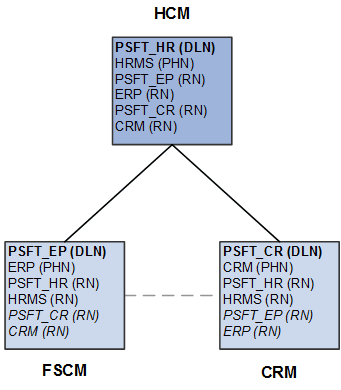
Under each system, the default local node is highlighted in bold and identified with the notation (DLN). For example, on the HCM system, the default local node is PSFT_HR. On the FSCM system, the default local node is named PSFT_EP. The portal host nodes are identified with the notation (PHN). On the FSCM system, the portal host node is named ERP. On the CRM system, the portal host node is named CRM.
Important:
Unified navigation supports same portal integration only—for example, EMPLOYEE portal to EMPLOYEE portal, CUSTOMER portal to CUSTOMER portal, or PARTNER portal to PARTNER portal, and so on. Moreover, you should always use the content provider system's portal host node to create remote folders or import pagelets.
Finally, under each system, the remote nodes that need to be defined are identified with the notation (RN). For example, on the HCM system, four remote nodes would need to be defined: PSFT_EP, ERP, PSFT_CR, and CRM. On each of the content provider systems, the two remote nodes representing the portal system would need to be defined at a minimum: PSFT_HR and HRMS. Then, on each content provider system, configure each participating node from each of the other content provider systems. These additional remote nodes are also designated with (RN) and are highlighted in italics.
Note the following when creating node definitions:
-
Using delivered (standard) node names simplifies the number of steps to complete the integration.
-
Each node name must be unique across all of the participating systems.
For example, multiple copies of a PeopleSoft application can be federated as content provider systems in a cluster—for example, two copies of PeopleSoft FSCM. You must rename both the default local node and portal host node on one of the copies—for example, PSFT_EP2 and ERP2.
-
When using non-standard (non-delivered) node names, you must create node definitions for these nodes in each participating system.