Understanding Service URL Parameters
A service might need additional parameters to obtain the context for the data that the service provides. You define these parameters in the Service URL Parameter grid. When the subject matter expert assigns the service to a content reference, she or he maps values to the parameters. Then, when the service is invoked from the transaction page, contextual values from fields in the buffer, system variables, or even fixed values that were mapped to the parameters are passed as arguments to the service.
Service URL Parameter Grid
This example illustrates the fields and controls related to the Service URL Parameter grid. You can find definitions for the fields and controls later on this page.

| Term | Definition |
|---|---|
|
Post mapping definition data |
Select to have the mapping definition data, such as the parameter name and its mapping page field or key field name, and the parameter’s actual mapped value posted with the service request. This option is deselected by default. |
|
Escape URL Parameters |
Select to escape, or encode, the service URL parameters and values when the application forms the complete service URL. The default value is selected. Use when either service parameters or parameter values include special characters, such as the single quote (') and the percent sign (%). Note: The PeopleSoft system encodes only the portion of the URL that follows the equal (=) sign and excludes the sign itself. |
|
Parameter Name |
Enter any additional service parameters for the service. You can map the parameter to a contextual field on an application page when you assign the service to the page. See “Service Parameter Mapping” in Understanding Service Parameter, Filter, and Security Configuration. |
|
Required |
Select this check box when the additional parameter is necessary for a service to return a valid output. This check box is deselected by default. If the service is designed with no default value and a blank value is passed to the parameter, an error or blank output could occur, depending on how the service is designed to handle this scenario. To avoid this situation, you can mark one or more additional service parameters as required so that the service will be invoked with a valid value for its service parameters. Important: When this required check box is selected, the subject matter expert or administrator must map a field or value to the parameter on the Related Content - Map Fields page or the system does not allow the service assignment to be saved. See “Service Parameter Mapping” in Understanding Service Parameter, Filter, and Security Configuration. |
|
Description |
Enter a parameter description that is meaningful for the subject matter expert or administrator who configures the related content assignment and mapping. |
Content Reference Attributes as Service URL Parameters
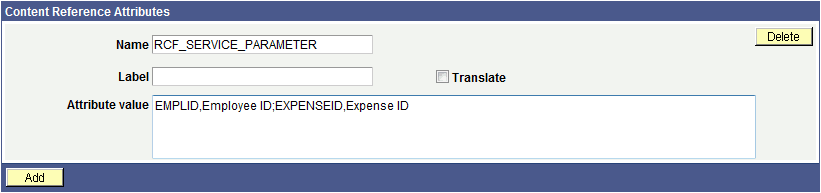
When you assign a content reference as an anonymous service, the system automatically defines service parameters for the components that provide either a valid search record or contextual record. You can manually define the RCF_SERVICE_PARAMETER attribute on the Content Ref Administration page for any content reference, such as for pagelets, iScripts, or for other content references that do not have a valid search record. If this RCF_SERVICE_PARAMETER attribute exists, the system automatically uses the attribute values as the service parameters for the content reference.
Note these points about the RCF_SERVICE_PARAMETER attribute.
-
The RCF_SERVICE_PARAMETER attribute overrides the default behavior of component-based URLs. The system will not retrieve the service parameters from a valid search record or contextual record, rather the system overrides any search record parameters with the parameters included in the Attribute Value field.
-
The attribute value format should follow this pattern:
NAME1,Label1;NAME2,Label2 with NAME identifying the service parameter and Label identifying the label for the service parameter. For example, EMPLID,Employee ID;EXPENSEID,Expense ID.
-
The NAME attribute value must not include spaces.
The following example shows content reference definition that uses the RCF_SERVICE_PARAMETER attribute:
Related Topics