Understanding Tile Definitions and the Tile Repository
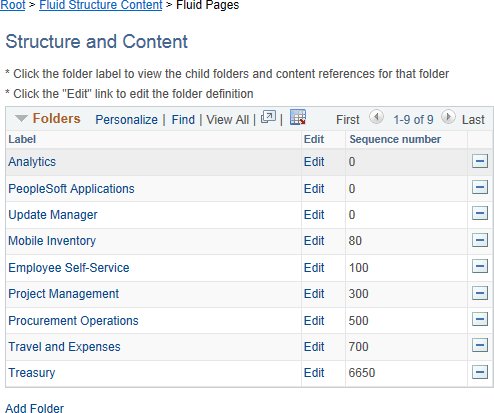
All tile definitions are stored in folders within the portal registry referred to as the tile repository. Specifically, the subfolders under Fluid Structure Content > Fluid Pages comprise the tile repository.
Important:
Only one level of subfolders under the Fluid Pages folder is supported in the tile repository.
The following example displays subfolders in the tile repository:
Tile definitions are created in the tile repository either manually or by using Tile Wizard. In either case, the tile definition is either a content reference or a content reference link:
-
When the target page is an existing content reference, modify the Fluid Attributes page tab for the existing content reference definition to create a content reference link in the tile repository.
Note:
When you use Tile Wizard to create the tile definition, the content reference link is created automatically when you select Content Reference as the target content type.
-
When the target page is a delivered viewer component or other specialized component (for example, the pivot grid viewer, the activity guide start page, or others), create a new content reference definition in the tile repository with the appropriate URL definition.
Related Topics