Using iFrame-Based Dynamic Templates
All dynamic iframe-based templates are retrieved from a URL rather than from an HTML document. Most commonly, the URL for dynamic templates is an iScript URL. As with other templates, the template content reference must be defined as a template on the portal administration pages. However, instead of including specific HTML content, the dynamic template references an iScript. The iScript is associated with a specified field in a specified record.
Important:
HTML templates are desupported as of PeopleTools 8.50. PeopleSoft applications require iframe templates to function as designed. Features that are unsupported in HTML templates experience significant or total loss of functionality; such features include:
• Modal windows used for prompts, secondary pages, and grid zoom.
• Main Menu drop-down navigation.
• Related content.
• WorkCenter pages.
• Global search header.
Important:
The drop-down menu, menu pagelets, and other forms of classic navigation are no longer supported. The default navigational interface for PeopleSoft applications in the current release is based on the fluid banner, which can be used for both classic and fluid applications. For information on working with the fluid user interface, see Applications User’s Guide: Working with Fluid Pages and Controls.
This example illustrates the content reference definition for an iframe-based dynamic template named DEFAULT_TEMPLATE:
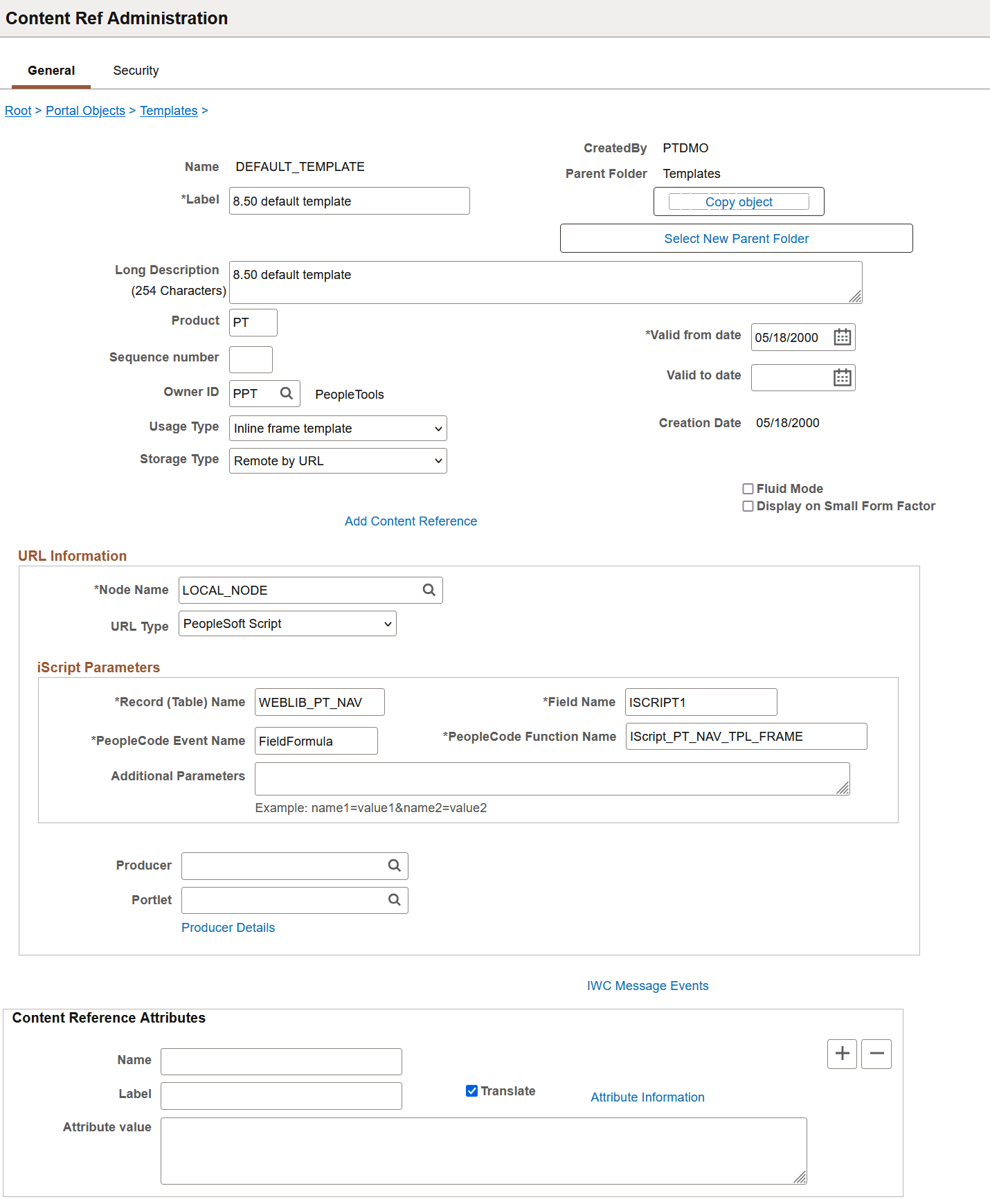
The content reference storage type is set to Remote by URL. This setting is required for dynamic templates. Additionally, no HTML area displays the associated HTML code for the template, as you would expect with a static template. Instead, when the URL type for this example is set to PeopleSoft Script, an iScript parameters area appears on the page, in which you can define the record name, field name, PeopleCode event name, and PeopleCode function name that specify the iScript to use for the template.
The iScript that dynamically generates the template is located in the WEBLIB_PT_NAV record in the ISCRIPT1 field, as shown in this example:
This example illustrates the WEBLIB_PT_NAV record associated with a dynamic template.
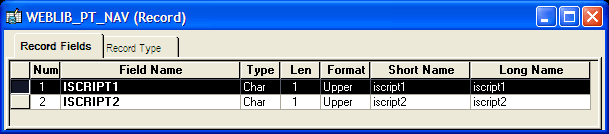
Additionally, the iScript function is associated with the FieldFormula PeopleCode event. The PeopleCode function name is IScript_PT_Frames_Template.
You can select the PeopleCode Display view to see which fields have PeopleCode programs defined for which PeopleCode events. By convention, function libraries have PeopleCode defined for the FieldFormula event.

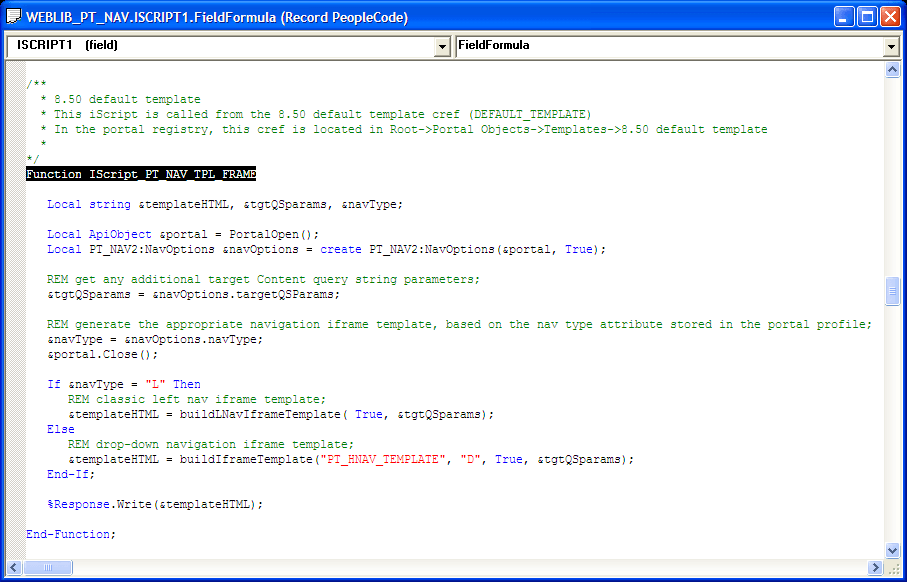
Once you open the appropriate record and field in PeopleSoft Application Designer, you can view the FieldFormula PeopleCode. The iScript is referenced by the PeopleCode function name in the template’s definition. An easy way to find the exact reference is to copy the PeopleCode function name from the template definition and paste it into the Find dialog box of the PeopleCode editor once you open the corresponding record and field.
This example illustrates the PeopleCode of the iScript that is referenced by the portal template:
The following code calls the PT_IFRAME_TEMPLATE HTML definition from the HTML catalog and passes the definition bind variables:
Return GetHTMLText(HTML.PT_IFRAME_TEMPLATE, &charSet, &requiredToolsSS, &sys⇒
DefaultSS, &domainJS, &expireJS, &ptCommonJS, &ptEventJS, &ptUtilJS, &ptAjaxJS,⇒
&crossDomainJS, &saveWarnJS, &iframeHdrJS, &iframeJS, &rcJS, &navHeader.HTML,⇒
&nav2JS, &ptPopupJS, ¶ms1, &encryptedUserId, &rcMenuJS, &rcHTML1, &tgtIframe⇒
Title, &rcServiceJS, &cssOverride);
The resulting HTML code
forms the basis for the dynamic portal template at runtime. You can
open the PT_IFRAME_TEMPLATE HTML definition in PeopleSoft Application
Designer, as shown in this example, and see where the bind variable
is passed in (note that this is an iframe-based template, as <iframe> tags
are present):
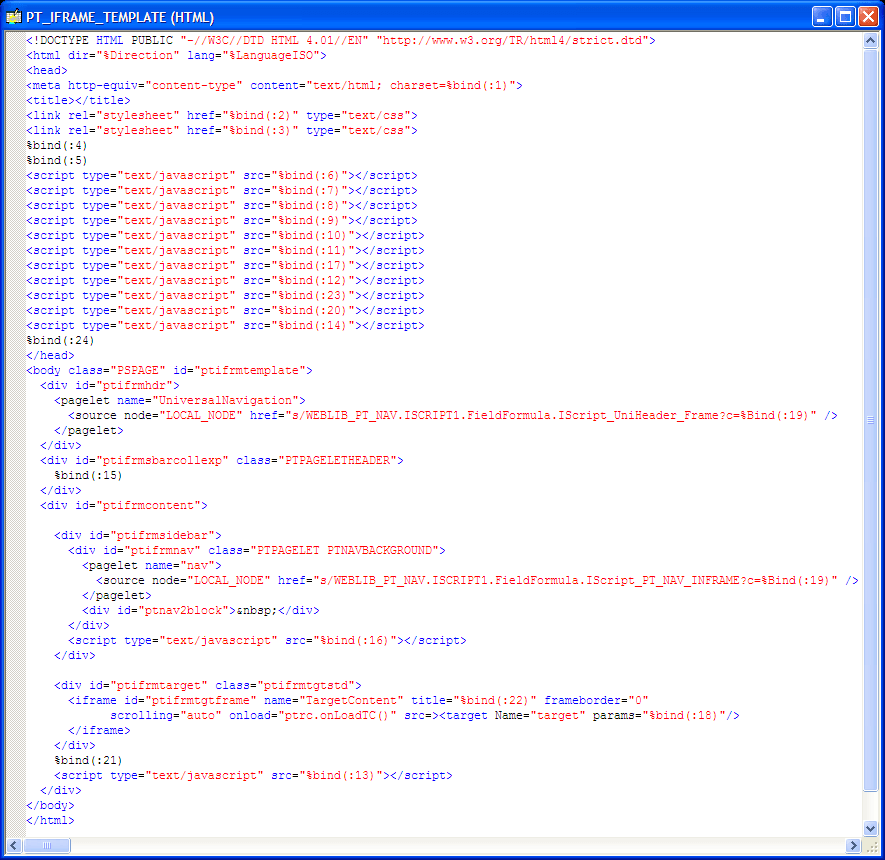
Inline frame-based,
or iframe-based, templates enable you to embed a frame within an HTML
document rather than as a frameset. You can use the iframe <source> attribute
to load content into the template. PeopleSoft applications use this
attribute for target content only. The header and navigation content
are in the HTML document itself as you see in the preceding PT_IFRAME_TEMPLATE
HTML definition:
Note the following points about the standard iframe template:
-
The Usage Type is set to Inline frame template; this is a requirement for all iframe-based templates.
-
The iframe HTML definition supports only the <pagelet> and <target> meta-tags.
Important:
The IClientComponent meta-tag is not supported.
-
Using inline frames enables you to click the navigation and see only the target content change. The entire page does not refresh. This approach allows for much more flexibility and facilitates the header and navigation working together.
-
When you navigate to different content within the iframe template, the URL in the browser address bar may not be up to date.
-
If you create your own iframe-based template, include the !DOCTYPE at the top of the code.