Using Frame-Based Dynamic Templates
All dynamic frame-based templates are retrieved from a URL rather than from an HTML document. Most commonly, the URL for dynamic templates is an iScript URL. As with static templates, the template content reference must be defined as a template on the portal administration pages. However, instead of including specific HTML content, the dynamic template references an iScript. The iScript is associated with a specified field in a specified record.
This example illustrates the content reference definition for a frame-based dynamic template named PT_85X_FRAMES_TEMPLATE:
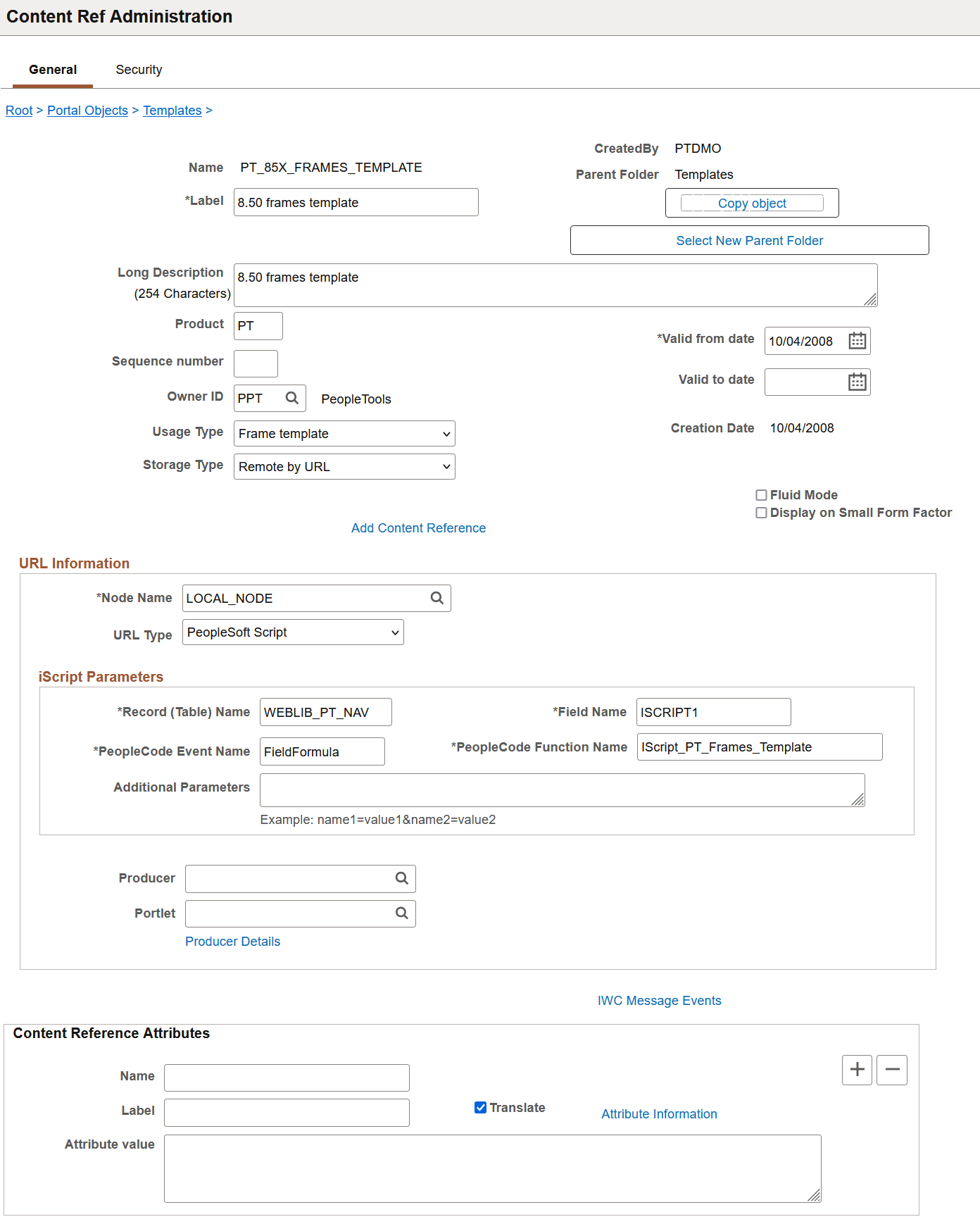
The content reference storage type is set to Remote by URL. This setting is required for dynamic templates. Additionally, no HTML area displays the associated HTML code for the template, as you would expect with a static template. Instead, when the URL type for this example is set to PeopleSoft Script, an iScript parameters area appears on the page, in which you can define the record name, field name, PeopleCode event name, and PeopleCode function name that specify the iScript to use for the template.
In this example, an iScript that dynamically generates the template is located in the WEBLIB_PT_NAV record in the ISCRIPT1 field, as shown in PeopleSoft Application Designer in this example:
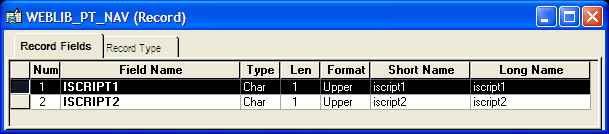
Additionally, the iScript function is associated with the FieldFormula PeopleCode event. The PeopleCode function name is IScript_PT_Frames_Template.
You can select the PeopleCode Display view to see which fields have PeopleCode programs defined for which PeopleCode events. By convention, function libraries have PeopleCode defined for the FieldFormula event.
This example illustrates which fields have PeopleCode programs defined for which PeopleCode events.

Once you open the appropriate record and field in PeopleSoft Application Designer, you can view the FieldFormula PeopleCode. The iScript is referenced by the PeopleCode function name in the template’s definition. An easy way to find the exact reference is to copy the PeopleCode function name from the template definition and paste it into the Find dialog box of the PeopleCode editor once you open the corresponding record and field.
This example illustrates the PeopleCode for the iScript that is referenced by the portal template.
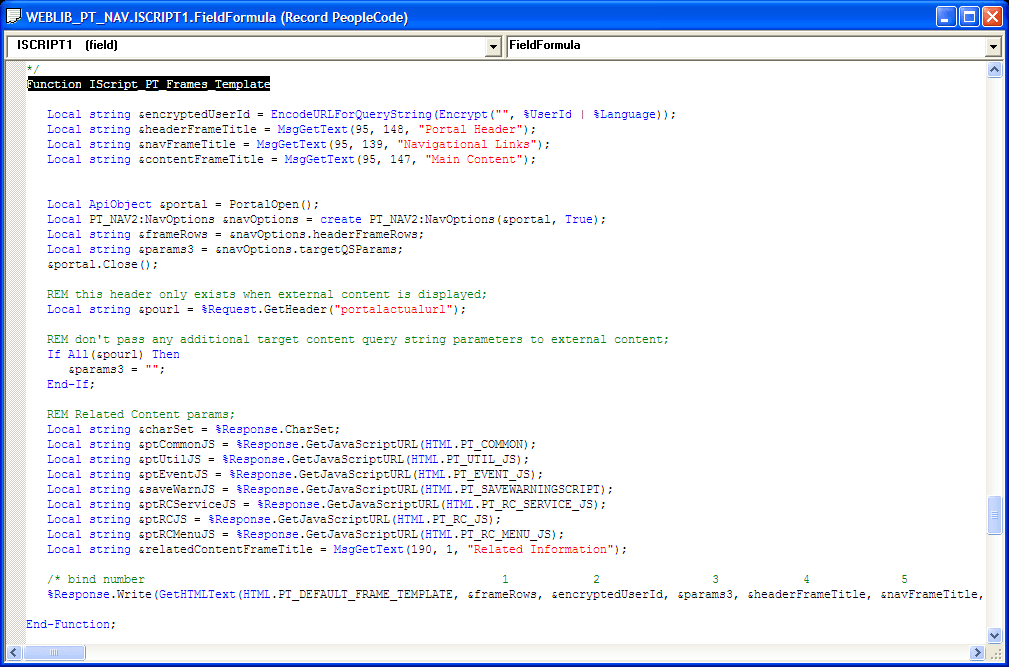
The following code calls an HTML definition called PT_DEFAULT_FRAME_TEMPLATE from the HTML catalog and passes the definition bind variables:
%Response.Write(GetHTMLText(HTML.PT_DEFAULT_FRAME_TEMPLATE, &frameRows, &encrypted⇒
UserId, ¶ms3, &headerFrameTitle,
&navFrameTitle, &contentFrameTitle, &relatedContentFrameTitle, &charSet, &pt⇒
CommonJS, &ptUtilJS, &ptEventJS, &ptRCMenuJS,
&ptRCServiceJS, &ptRCJS, &saveWarnJS));
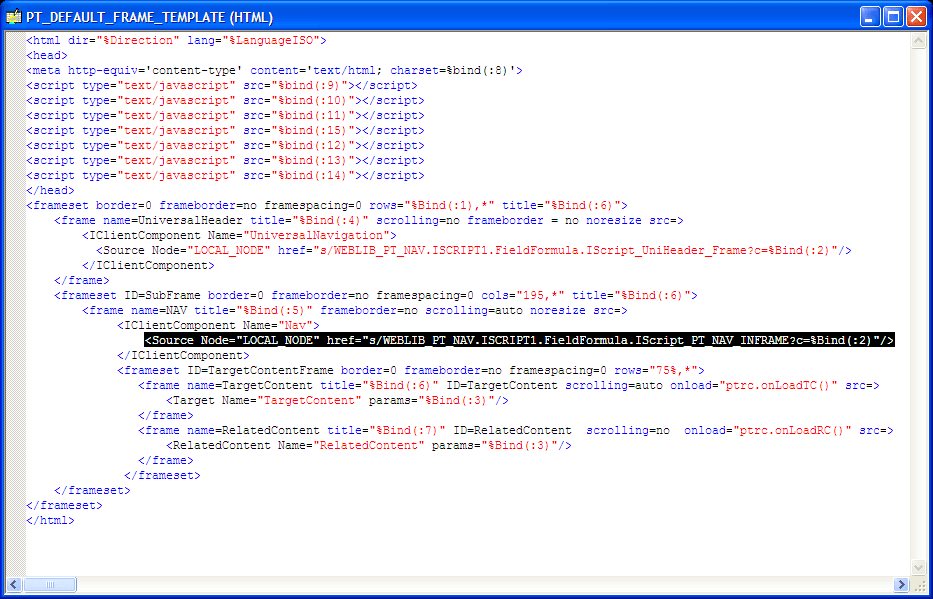
The resulting HTML code forms the basis for the dynamic portal template at runtime. You can open the HTML definition PT_DEFAULT_FRAME_TEMPLATE in PeopleSoft Application Designer, as shown in this example, and see where the bind variable is passed in (note that this is a frame-based template, as frame tags are present):
Related Topics