Viewing Menu Security Details
Access the Menu Security page ().
This example illustrates the fields and controls on the Objects tab of the Menu Security page. You can find definitions for the fields and controls later on this page.
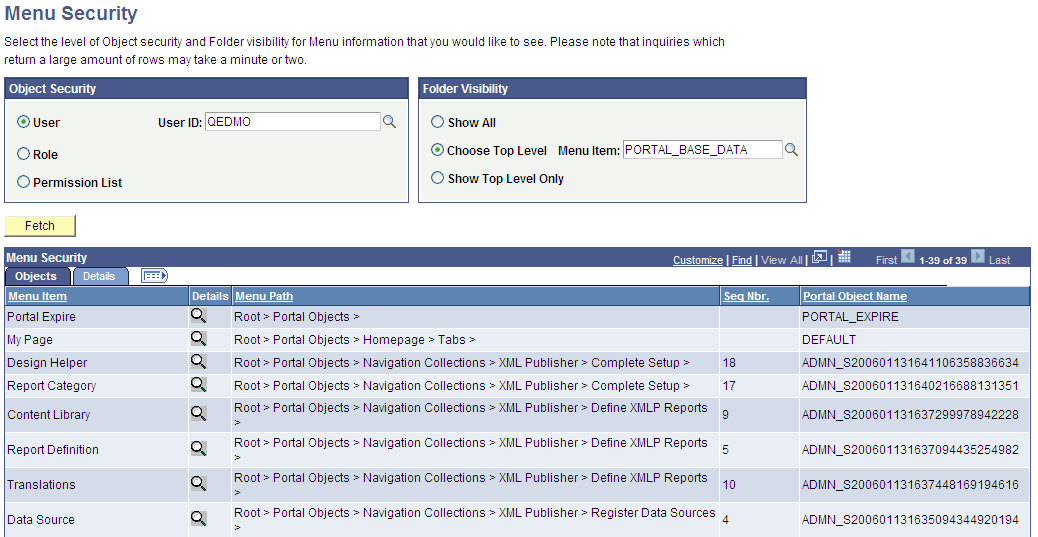
Use this page to view a list of folders or content references that a user ID, role, or permission list can access.
Note:
The Seq Nbr (sequence number) column is hidden in this illustration, and because of the large number of objects, not all are shown.
Object Security
Select the level of object security for the menu information that you want to see.
| Field or Control | Description |
|---|---|
|
User, Role, and Permission List |
Select a type of object security, and then select an object. You can view the complete menu folder structure that is available in the navigation (or hidden, but accessible from another page) for the selected security value. |
WARNING:
To prevent unexpected errors and inordinately long retrieval times, do not select the ALLPAGES permission list in conjunction with the Show All folder option. Always narrow your folder options if you select the ALLPAGES permission list.
Folder Visibility
Select the level of visibility for the menu information that you want to see.
| Field or Control | Description |
|---|---|
|
Show All |
Select to view all objects. Note: To avoid unexpected errors and inordinately long retrieval times, Oracle recommends that you not select this option if you select the ALLPAGES permission list in the Object Security section. |
|
Choose Top Level |
Select a level-one folder. The Menu Security grid displays all content references and their complete paths below this level that are accessible by the selected object security level. |
|
Show Top Level Only |
Select to display only the level-one folders that are accessible by the object security type. |
Permission Lists
If either the Role object security option or the Show Top Level Only folder visibility option is selected, then this scroll area appears, displaying the permission lists that are associated with each menu item.