Adding Bookmarks for PSQuery, Connected Query, BIP Query-Based Reports or nVision Report Request
To add a process bookmark for a PSQuery, Connected Query, BIP Query-Based Reports or nVision Report Request:
-
From the Reporting Console home click the Add link for My Favorites.
-
Select the Process Bookmarks radio button.
-
Select the radio button for the type of report (PeopleSoft Query , Connected Query, Query-Based BIP Reports or nVision Report Request).
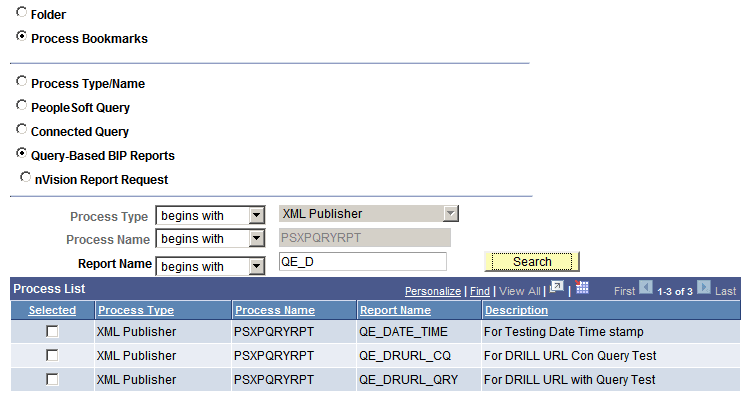
The Process Type and Process name will be displayed in read-only format for the selected process type:
This example illustrates the fields and controls on the Query-Based BIP Reports list.
-
Depending on the non-unique process an additional edit box is available to refine your report search as listed in this table:
Process Name Additional Edit Box PeopleSoft Query
Query Name
Connected Query
Name
Query-Based BIP Report
Report Name
nVision Request
Report ID
Note:
You could also use the Find link in the process list grid to further refine your search criteria.
-
Select the check box for each process to bookmark.
-
Click Bookmark Selected.