Adding New Process Definitions
Access the Process Definition page ().
This example illustrates the fields and controls on the Process Definition page. You can find definitions for the fields and controls later on this page.
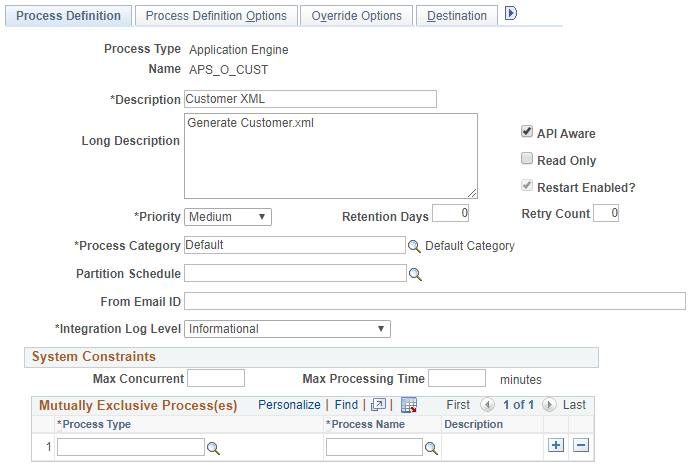
| Field or Control | Description |
|---|---|
|
Process Type |
Indicates the Process Type selected. |
|
Name |
This name must match the file name of the process that you are defining. For example, if you are defining a SQR report named MYSQR.SQR, you must define the process name as MYSQR. |
|
Description |
Specifies a description for the Process definition. |
|
Long Description |
This field is optional. |
|
API Aware |
Select this check box if this process is an API-aware process. If this check box is selected for any process that is not API-aware, PeopleSoft Process Scheduler includes this process in the concurrent task count. This can result in improper server load balancing. Selecting this option does not mean that the process becomes API-aware. You must still add API code to the process. The PeopleSoft Application Engine, COBOL, SQR, Cube Builder, nVision, Data Mover, and XML Publisher process types should be API-aware. If API Aware is deselected for any of these process types, it is recorded on the SYSAUDIT report. |
|
Read Only |
Used only on Oracle databases with Oracle Active Data Guard enabled and configured for use within your PeopleSoft implementation. The Read Only option enables a [component | process] to run against the read-only, standby database, rather than your production database. |
|
Restart Enabled? |
Select if the system should attempt to automatically restart this process if it is marked with a run status of Error. |
|
Priority |
Select High, Medium, or Low to define the relative priority that is used by the PeopleSoft Process Scheduler Agent to determine which process to initiate first if multiple processes are queued to run on a server. |
|
Retention Days |
Set the retention days that are used to determine the expiration date. The expiration date is determined by adding the retention days from the date on which the report was generated. Note: The retention days value entered for a process definition will be the default retention days when the process is run. |
|
Retry Count |
Enter the number of times the system should attempt to automatically restart this process. Note: This field becomes active only if the Restart Enabled? check box is selected. |
|
Process Category |
Select a process category for this process. Note: The categories Default and LOADCACHE are delivered with your system. |
|
Partition Schedule |
Specify the name of the partition schedule. This field is optional. |
|
From Email ID |
Enter an email ID which must be used as the Sender ID for all instances of the process for report distribution in case of destination output type set to Email and for Process Status Notifications. This field is optional. |
|
Integration Log Level |
Select to set the integration log level for process status change messages when SetNotifyAppMethod() or SetNotifyService() is used while scheduling the process. Error: Select to log only error messages in IB transactions for process status changes for this process. Informational: Select to log all messages in IB transactions for process status changes for this process. None: Select to log no messages for process status changes for this process. |
System Constraints
Important:
For system constraints to be evaluated, you must configure the system with a master scheduler. In the absence of a master scheduler, the system ignores settings for the following options.
| Field or Control | Description |
|---|---|
|
Max. Concurrent (maximum concurrent) |
Enter the maximum number of occurrences of this process that can be active at one time across all process schedulers. If this field is left blank (default), the value becomes Unlimited. Processes exceeding the maximum appear in the Process Monitor with a run status of Blocked. As active occurrences finish, blocked processes are released and queued. |
|
Max. Processing Time (maximum processing time) |
Enter the maximum processing time for this process. If this field is left blank (default), the value becomes Unlimited. The system cancels the process if processing exceeds the time that is entered here. |
|
Mutually Exclusive Process(es) |
Enter the type and name all the processes that must not run at the same time as this process. Processes failing this constraint appear on the Process Monitor with a run status of Blocked. When mutually exclusive processes finish, blocked processes are released and queued. |
Related Topics