Associating URLs
To access the URL Links page, select
This example illustrates the fields and controls on the URL Links page. You can find definitions for the fields and controls later on this page.
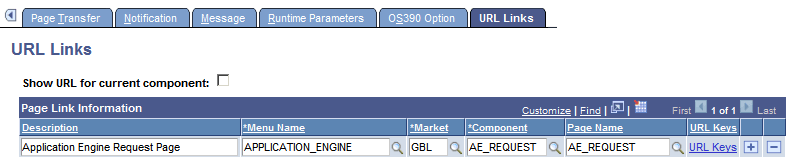
Use this page to associate multiple URLs with a process definition. The links appear on the Report Detail page, which is accessible from the Process Monitor and the Report Manager.
| Field or Control | Description |
|---|---|
|
Show URL for current component |
Select to create a link to the current component. |
|
Description |
Enter a description for the link. |
|
Menu Name, Market, Component, and Page Name |
Select to create the URL path and destination. |
|
URL Keys |
Click to access the Edit URL Detail page. |
Editing URL Key Fields
Access the Edit URL Details page.
This example illustrates the fields and controls on the Edit URL Details page.
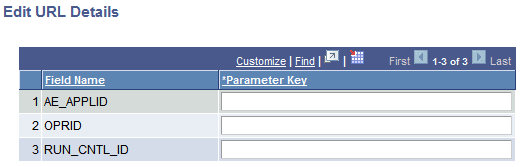
Use this page to view or edit the key fields of the selected URL.