Defining FTPS Distribution Node
To access the FTPS distribution node page, select FTPS from the Protocol List.
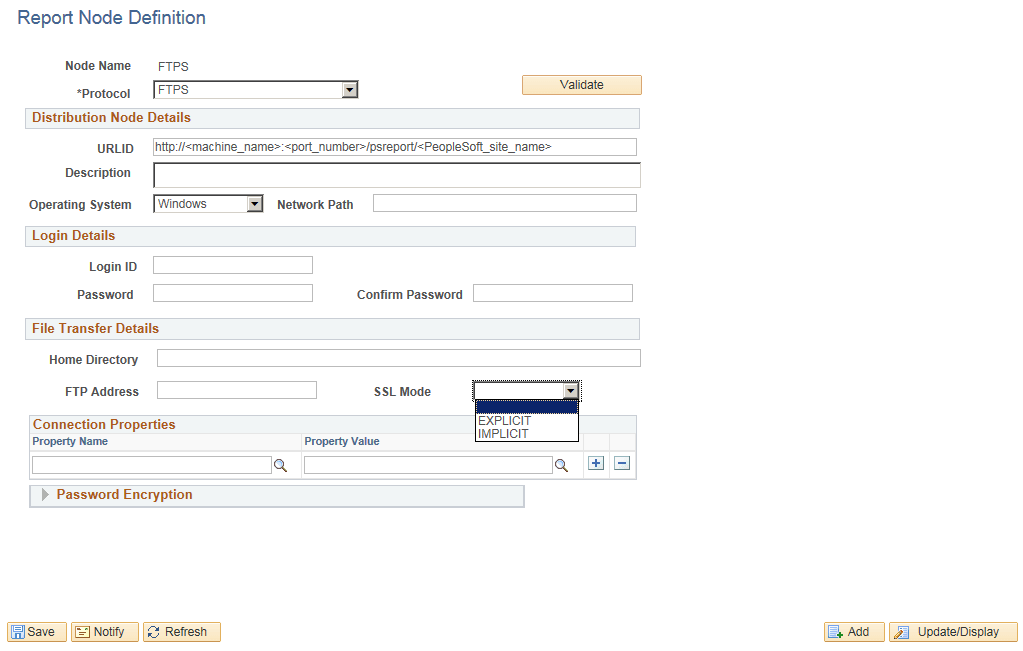
This example illustrates the fields and controls on the Report Node Definition — FTPS page. You can find definitions for the fields and controls later on this page.
| Field or Control | Description |
|---|---|
|
Home Directory |
Enter the directory that is specified during the installation of PeopleSoft Pure Internet Architecture as the Report Repository. |
|
FTP Address |
Enter the machine name or TCP/IP information for the Report Repository. |
|
Login ID, and Password |
Specify the FTPS user ID and password. |
|
SSL Mode |
Specify the SSL mode. |
|
(Optional) Connection Properties |
Specify the connection property name and property value for FTPS transfer. You must set the connection properties to configure the security modes such as, Active mode or Extended Passive mode of file transfer. |
|
Password Encryption |
Generate an encrypted password.
|