Defining HTTP Distribution Nodes
To access the Http Distribution Node page, select . From the Protocol list, select HTTP.
Note:
You should use web server basic authentication when you configure the SchedulerTransfer servlet that is used by the report distribution system. Please see the install guide for details.
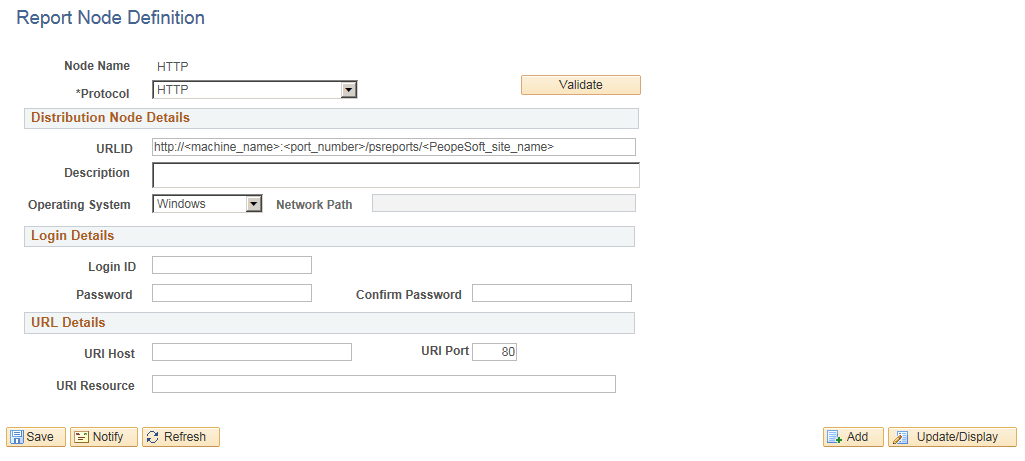
This example illustrates the fields and controls on the Report Node Definition — HTTP page. You can find definitions for the fields and controls later on this page.
| Field or Control | Description |
|---|---|
|
Login ID, Password, and Confirm Password |
These are required only when the Web administrator has set up basic authentication on the Web server. |
|
URI Host |
Enter the machine name. If you are using PeopleSoft Process Scheduler for UNIX, you must enter either the fully qualified name (for example, ADHP04.example.com or the IP address. Warning! If you specify the Auth Token Domain name during the PeopleSoft Pure Internet Architecture installation, you must include a fully qualified domain name on the URL Host instead of the IP address. Otherwise, the Distribution Agent will not pass authentication. |
|
URI Port |
Enter the port number. This value must match the port number of the Web server. The default is 80. Note: If you change a port number, you lose the default value for the protocol. |
|
URI Resource |
Enter SchedulerTransfer/<PeopleSoft site name>. |
|
Save |
Click to save your entries. To add additional distribution nodes, click the Add button to return to the search page. |
File Chunking
The Distribution Agent automatically breaks up a large file and sends it in multiple HTTP posts. For example, a 150 MB file can be sent in 10 × 15 MB, 15 × 10 MB, and so on.
To accommodate different hardware configurations (memory) and dissimilar Java Virtual Machine (JVM) tuning, two new parameters have been added to the PeopleSoft Process Scheduler section of the configuration file (prcs.cfg):
-
Chunking Threshold
-
File Chunk Size
These parameters enable clients to determine the most favorable configuration for their systems by trading off between the number of hits to the Web server when sending small chunks and memory usage due to sending large chunks.
Related Topics