Defining HTTPS Distribution Node
Access the HTTPS distribution node page. Select HTTPS from the Protocol list.
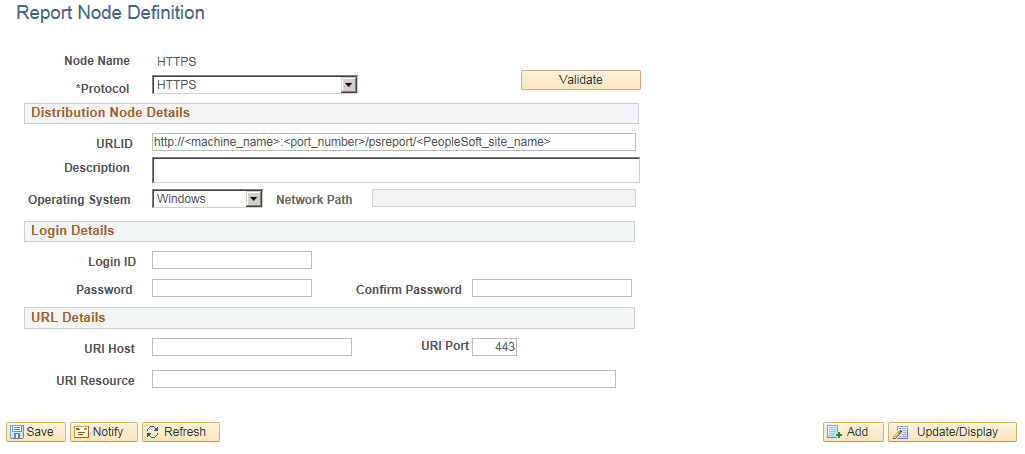
This example illustrates the fields and controls on the Report Node Definition — HTTPS page. You can find definitions for the fields and controls later on this page.
| Field or Control | Description |
|---|---|
|
Login ID, Password, and Confirm Password |
These are required only when the Web administrator has set up basic authentication on the Web server. |
|
URI Host |
Enter the machine name. If you are using PeopleSoft Process Scheduler for UNIX , you must enter either the fully qualified name (for example, ADHP04.example.com or the IP address. Warning! If you specify the Auth Token Domain name during the PeopleSoft Pure Internet Architecture installation, you must include a fully qualified domain name on the URL Host instead of the IP address. Otherwise, the Distribution Agent will not pass authentication. |
|
URI Port |
Enter the port number. This value must match the port number of the Web server. The defaults is 443. Note: If you change a port number, you lose the default value for the protocol. |
|
URI Resource |
Enter SchedulerTransfer/<PeopleSoft site name>. |
|
Save |
Click to save your entries. To add additional distribution nodes, click the Add button to return to the search page. |