Defining SharePoint Distribution Nodes
You can configure a Process Scheduler report node to distribute report output to a Microsoft SharePoint document library.
Access to a SharePoint site and document library requires an application registration in Microsoft Entra ID, formerly Azure Active Directory, which PeopleSoft uses to authenticate with Microsoft Graph. See Registering an Azure Application for SharePoint Repositories and Defining SharePoint Repositories.
To use SharePoint as a report repository:
- Create a report node using the HTTPS protocol.
- Specify the Microsoft Graph endpoint information and authentication properties required to access the SharePoint site.
- Configure a Process Scheduler server to use the SharePoint report node as its distribution node.
Defining a SharePoint Report Node
Navigation:
PeopleTools >Process Scheduler >Report Nodes.
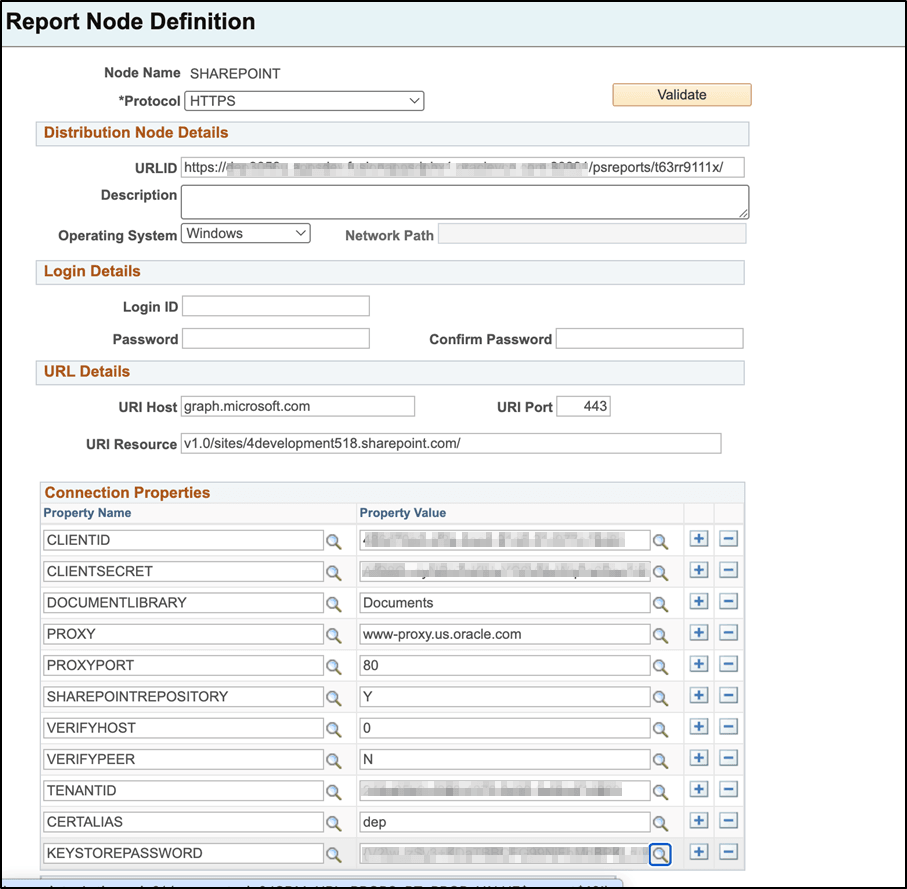
| Field or Control | Description |
|---|---|
|
Protocol |
Transfer protocol for SharePoint report nodes. Select HTTPS. |
|
URLID |
Enter the Process Scheduler report URL. This URL is used to construct report access URLs returned to PeopleSoft users. |
|
Description |
Enter an optional description for the report node. |
|
Operating System |
Select the operating system on which the report repository is accessed. |
|
URI Host |
Enter the Microsoft Graph host name. For example, graph.microsoft.com. |
|
URI Port |
Enter the port number used by URI host. |
|
URI Resource |
Enter the Microsoft Graph resource path for the SharePoint site. |
|
CLIENTID |
Enter the Microsoft Azure AD application client identifier. |
|
CLIENTSECRET |
Enter the client secret associated with the registered application. |
|
DOCUMENTLIBRARY |
Name of the SharePoint document library that stores report output. |
|
PROXY |
Proxy server name, if your environment requires a proxy for outbound HTTPS connections. |
|
PROXYPORT |
Proxy server port. |
|
SHAREPOINTREPOSITORY |
Set to Y to identify the repository as a SharePoint repository. |
|
VERIFYHOST |
Specifies whether host name verification is performed during SSL certificate validation. |
|
VERIFYPEER |
Specifies whether the server SSL certificate is validated. |
|
TENANTID |
Enter the Microsoft 365 tenant identifier. |
|
CERTALIAS |
Certificate alias used for client certificate authentication, if required. |
|
KEYSTOREPASSWORD |
Password for the keystore associated with the certificate alias, if applicable. |
After entering the required values, click Validate to verify the report node configuration. If validation succeeds, you can assign the report node to one or more Process Scheduler servers and use it as the report distribution repository.
Associating a Process Scheduler Server with a SharePoint Distribution Node
Navigation:
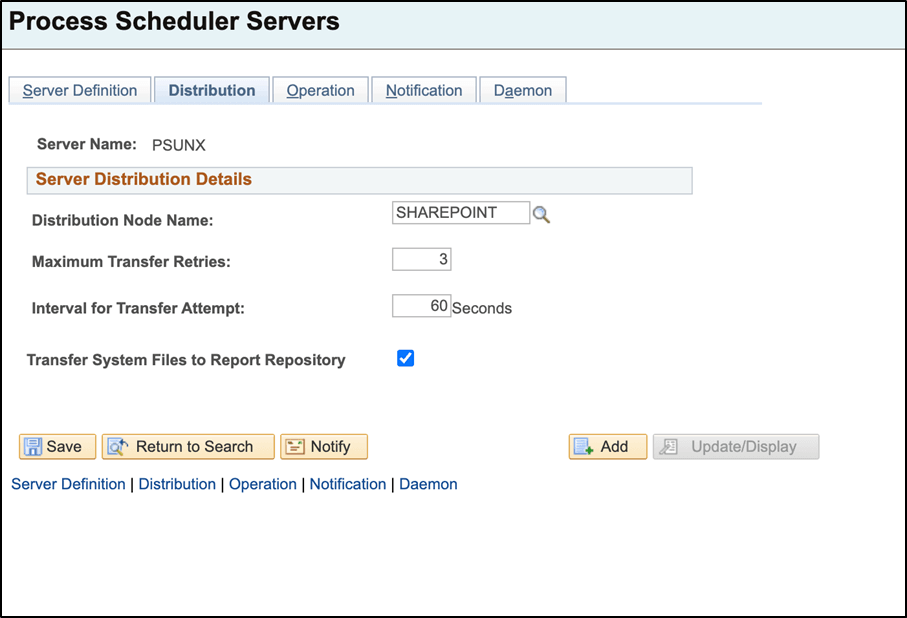
This example illustrates the fields and controls on the Process Scheduler Servers page. You can find definitions for the fields and controls later on this page.
| Field or Control | Description |
|---|---|
|
Distribution Node Name |
Select the SharePoint report node that receives reports generated by this Process Scheduler server. |
|
Maximum Transfer Retries |
Specify the maximum number of retry attempts if report distribution fails. |
|
Interval for Transfer Attempt |
Specify the number of seconds between retry attempts. |
|
Transfer System Files to Report Repository |
Select to distribute log and trace files along with report output. |