Defining Oracle Cloud Infrastructure Report Nodes
You can use Oracle Cloud Infrastructure (OCI) Object Storage as a file repository for File Attachments and a report repository for Process Scheduler Report Distribution. To configure a Report Node to work with a OCI report repository, you must configure a regular HTTPS Report Node pointing to Oracle Cloud Infrastructure Object Storage service.
This process requires that you have an account for Oracle Cloud Infrastructure Object Storage service. You specify account related information in Connection Properties.
This example illustrates the fields and controls on the Report Node Definition page.
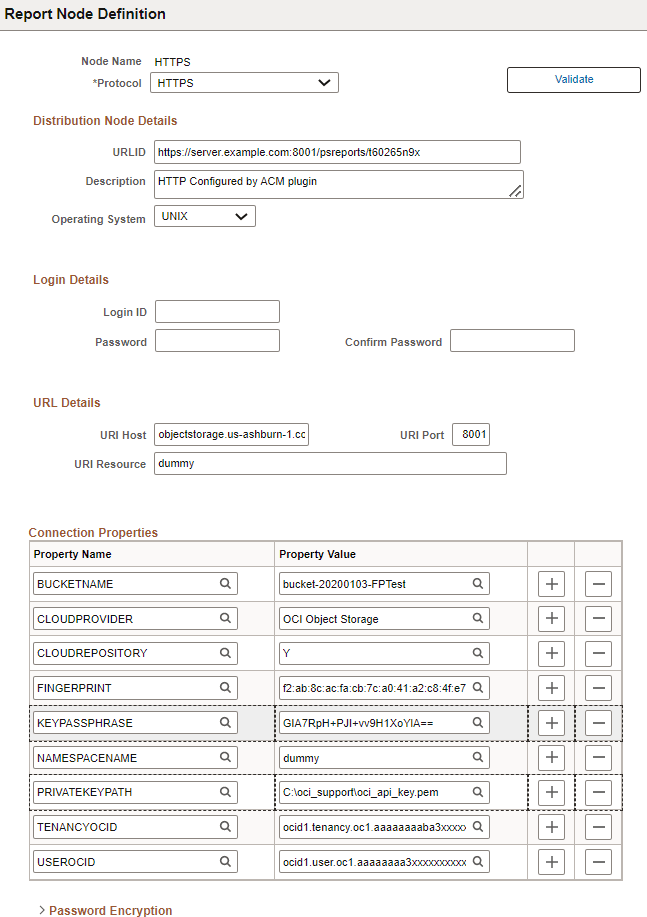
To define a Report Node for Oracle Cloud Infrastructure Object Storage:
-
Create a new HTTPS Report Node. See Defining HTTPS Distribution Node.
-
Populate the URLID field as you would do for any report node - <http(s)>://<hostname:port>/psreports/<sitename>.
-
Enter the hostname of Cloud storage instance in URI Host field.
-
Enter the port at which the Cloud storage server runs in the host machine.
-
Set the following Cloud repository related properties:
| Field or Control | Description |
|---|---|
|
BUCKETNAME |
The name of the bucket. A logical container for storing objects. Users or systems create buckets as needed within a region. see Overview of Object Storage. |
|
CLOUDPROVIDER |
Set to OCI Object Storage, if the CLOUDREPOSITORY is Y. |
|
CLOUDREPOSITORY |
Set to Y if this is Cloud repository, otherwise set to N. |
|
FINGERPRINT |
Fingerprint for the key pair being used. To get the value, see Required Keys and OCIDs. Example:
|
|
KEYPASSPHRASE |
Encrypted pass phrase for the API signing key pair. |
|
NAMESPACENAME |
The Object Storage namespace used for the request. A logical entity that serves as a top-level container for all buckets and objects, allowing you to control bucket naming within your tenancy. see Overview of Object Storage. |
|
PRIVATEKEYPATH |
The path to the private key file. The private key file must be in PEM format. |
|
TENANCYOCID |
OCID of your tenancy. To get the value, see Required Keys and OCIDs. Example: |
|
USEROCID |
OCID of the user calling the API. To get the value, see Required Keys and OCIDs. Example: |
Related Topics