Defining Report Nodes for Oracle Content and Experience Cloud
Report Distribution currently supports moving reports to FTP, FTPS, SFTP, HTTP, HTTPS repositories & XCOPY to a network share. A Report Node can be defined to work with these protocols only. PeopleSoft does not currently support configuring Report Node to work with a Cloud repository. So a regular HTTP/HTTPS Report Node has to be configured pointing to Oracle Content and Experience Cloud.
This example illustrates the fields and controls on the Report Node Definition — HTTPS page.
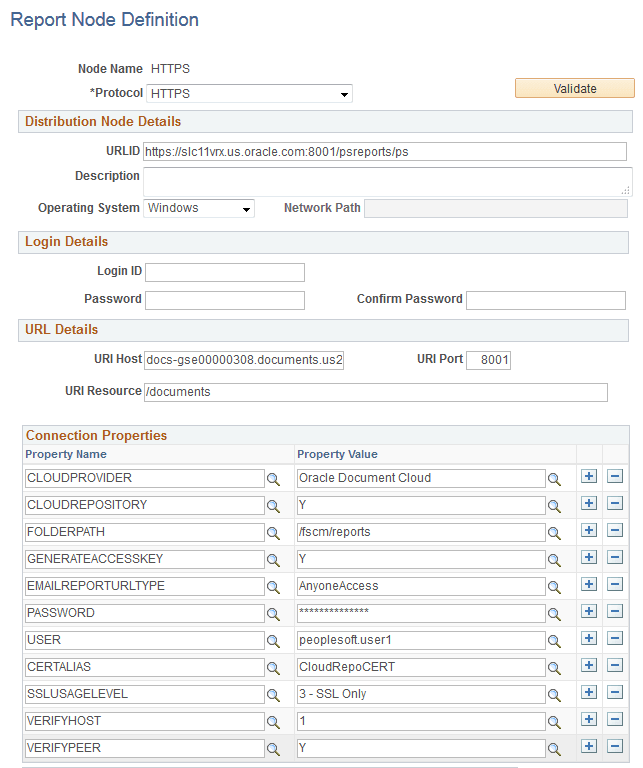
To define a Report Node pointing to Oracle Content and Experience Cloud:
-
Create a new HTTP/HTTPS Report Node. See Defining HTTP Distribution Nodes and Defining HTTPS Distribution Node.
-
Populate the URLID field as you would do for any report node - <http(s)>://<hostname:port>/psreports/<sitename>.
-
Enter the hostname of Cloud storage instance in URI Host field.
-
Enter the port at which the Cloud storage server runs in the host machine.
-
Enter documents in URI Resource.
-
Set the following Cloud repository related properties:
| Field or Control | Description |
|---|---|
|
CLOUDPROVIDER |
Set to Oracle Document Cloud, if the CLOUDREPOSITORY is Y. |
|
CLOUDREPOSITORY |
Set to Y if this is Cloud repository, otherwise set to N. |
|
FOLDERPATH |
Set the path in Cloud storage account to which the reports needs to be stored. |
|
GENERATEACCESSKEY |
Set to Y if you want to generate & access key for the Report URL that would be included in the email report distribution, otherwise set to N. |
|
EMAILREPORTURLTYPE |
Anyone Access - if you want the report URL sent in email distribution to be accessible to anyone on the web. Registered User Access - if you want the report URL sent in the email distribution to be accessible to only who have a valid account with the Oracle Cloud storage instance. Note: This property can be overriden at process definition level via property EmailReportURLType. |
|
PASSWORD |
Encrypted password of the Cloud account. |
|
USER |
Set Cloud account username to which the reports needs to be stored. |
|
CERTALIAS |
(Certificate Alias) The Certificate Alias must be an alias name of a certificate stored in the database (using the PeopleTools Digital Certificates page). Note: Currently, only PEM certificates are supported for FTPS. |
|
SSLUSAGELEVEL |
0 - No SSL: No SSL will be used. 1 - Try SSL: Try using SSL, but proceed as normal otherwise. 2 - Control: Require SSL for the control connection. 3 - SSL Only: (Default) Require SSL for all communication. |
|
VERIFYHOST |
0: Do not verify the server for hostname. 1: (Default) Checks for a match with the hostname in the URL with the common name or Subject Alternate field in the server certificate. |
|
VERIFYPEER |
False: Do not verify the peer. True: (Default) Verify the peer by authenticating the certificate sent by the server. |