Enabling Process Status Notification Locally
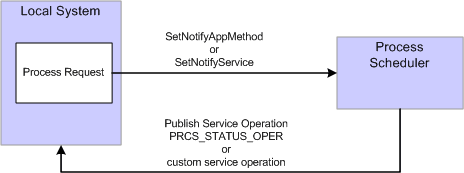
This diagram illustrates how you can set up process status notification to run locally:
This diagram illustrates how you can set up process status notification to run locally.
To enable process status notification locally:
-
Include SetNotifyService or SetNotifyAppClass in the process request.
-
Include AddNotifyInfo in the process request.
-
Add a local-to-local routing to the service operation PRCS_STATUS_OPER if you are using SetNotifyAppMethod. If you are using SetNotifyService, add the local-to-local routing to the service operation referenced in the SetNotifyService method.
To add the local routing to PRCS_STATUS_OPER service operation:
-
Select
-
Select PRCS_STATUS_OPER.
-
Select the Generate Local-to-Local check box.
-
Click Save.
-
-
Submit the process request.
-
After the process request completes, you can check the service operation monitor to verify that your process notification was received.
-
Select
-
Select the Operation Instances tab.
-
Enter PRCS_STATUS_OPER (or your custom service operation if you used SetNotifyService) in the service operation field and click Refresh.
-
Click the Details link for your Transaction Id.
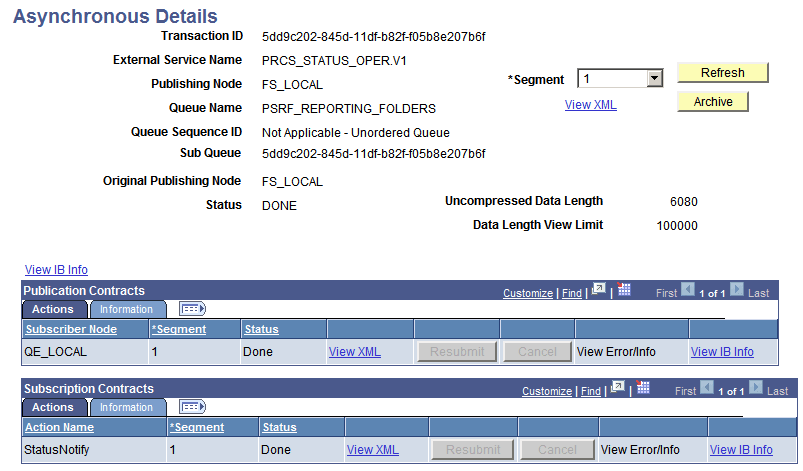
This is an example of the asynchronous details page. If any errors occur, the View Error/Info link can be used to view the error message. The View XML link will display the XML message.
Note:
The message may contain report instance related information for process requests with an output type of Web or Windows. Refer to the message PRCS_STATUS_MSG for the details on the fields that are published. (Select PeopleTools, Integration Broker, Integration Setup, Messages and search for message name PRCS_STATUS_MSG).
This example illustrates the fields and controls on the Asynchronous details page.
-
See Integration Broker: Managing System-Generated Routing Definitions.