Understanding Process Status Notification
Process status notification provides the ability to publish a process request status notification either locally or to a remote application. Upon receipt of the notification, you can trigger additional logic in your application based on the notification results. Notifications are published using service operations and routed by the Integration Broker. The service operation PRCS_STATUS_OPER is delivered and triggered when the SetNotifyAppMethod is invoked. This service operation does not contain any delivered routings. You can also create your own service operation and trigger it with the SetNotifyService method. Your PeopleCode program should call only one of these methods: either SetNotifyAppMethod or SetNotifyService. If both methods are used, the last method called takes precedence over the former.
SetNotifyAppMethod
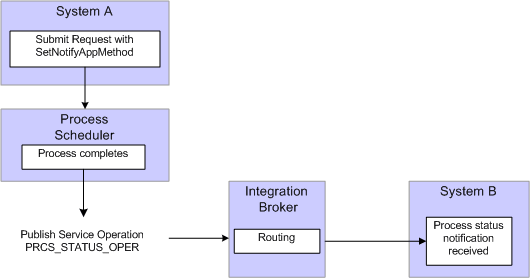
This method allows you to create your own application class to handle the notification and information you want to send. This method will invoke the service operation PRCS_STATUS_OPER, as shown in this diagram:
This example illustrates how to create application class that handles the notification and information through PRCS_STATUS_OPER service operation.
To use this method:
-
Create an application class to handle notifications.
This is an example of an application class to handle notifications:
class ProcessNotification
   method ProcessNotification();
   method ReceiveNotification(&_MSG As Message);
end-class;
method ProcessNotification
end-method;
method ReceiveNotification
   /+ &_MSG as Message +/
   Local Rowset &rs_msg, &NotifyInfo;
   Local Message &message;
   Local string &sName, &sValue;
   &rs_msg = &_MSG.GetRowset();
   /************************************************************************/
   /* Add logic you want to execute upon receiving notification            */
   /* For example :                                                        */
   /* &RQST.SetNotifyAppMethod("RECEIVE_NOTIFICATION:ProcessNotification", */
   /* "ReceiveNotification");                                              */
   /*  &RQST.AddNotifyInfo("SQR Report", "XRFMENU");                       */
   If &rs_msg(1).PRCS_STATUS.RUNSTATUS.Value = "9" Then
   /* process ran to success*/
      &NotifyInfo = &rs_msg.GetRow(1).GetRowset(Scroll.PRCSNOTIFYATTR);
      /* if you have more name-value pairs                           */
      /* add code to traverse the rows from the PRCSNOTIFYATTR rowset*/
      /* e.g. Get the first name-value pair */
      &sName = &NotifyInfo(1).PRCSNOTIFYATTR.PRCS_ATTRIBUT_NAME.Value;
      &sValue = &NotifyInfo(1).PRCSNOTIFYATTR.PRCS_ATTRIBUT_VALU.Value;
      /* logic to excute on success  */
      /* e.g. submit another process */
      Local number &PrcsInstance;
      Local ProcessRequest &RQST;
      &RQST = CreateProcessRequest();
      &RQST.ProcessType = &sName;
      &RQST.ProcessName = &sValue;
      &RQST.RunControlID = "test";
      &RQST.RunLocation = "PSNT";
      &RQST.OutDestType = "WEB";
      &RQST.OutDestFormat = "PDF";
      &RQST.RunDateTime = %Datetime;
      &RQST.TimeZone = %ServerTimeZone;
      &RQST.Schedule();
   Else
      /* other processing */
   End-If;
   /*************************************************************/
end-method
See PeopleCode API Reference: Understanding Application Classes.
-
Include SetNotifyAppMethod, using the application class and method created in step 1, in the process request.
-
Optionally, use AddNotifyInfo to include specific information in the message that will be published.
This is an example of a process request:
/*********************************************************************** * Construct a ProcessRequest Object. * ***********************************************************************/ &RQST = CreateProcessRequest(); &RQST.ProcessType = "SQR Report"; &RQST.Processname = "XRFMENU"; &RQST.RunControlID = "TEST"; &RQST.OutDestType = "WEB"; &RQST.OutDestFormat = "PDF"; &RQST.NotifyTextMsgSet = 65; &RQST.NotifyTextMsgNum = 237; &RQST.RunDateTime = %Datetime; &RQST.TimeZone = %ServerTimeZone; &RQST.SetNotifyAppMethod("RECEIVE_NOTIFICATION:ProcessNotification", "ReceiveNotification"); &RQST.AddNotifyInfo("SQR Report", "XRFMENU"); &RQST.Schedule(); &PRCSSTATUS = &RQST.Status; &PRCSINSTANCE = &RQST.ProcessInstance; If &PRCSSTATUS = 0 Then MessageBox(%MsgStyle_OK, "", 65, 366, "Process Instance", "XRFMENU",&PRCSINSTANCE); Else MessageBox(%MsgStyle_OK, "", 65, 0, "Process Instance", "Process Not submitted"); End-If; -
Add an outbound routing to the service operation PRCS_STATUS_OPER pointing to your remote system.
-
On the remote system add an inbound routing to the service operation PRCS_STATUS_OPER.
SetNotifyService
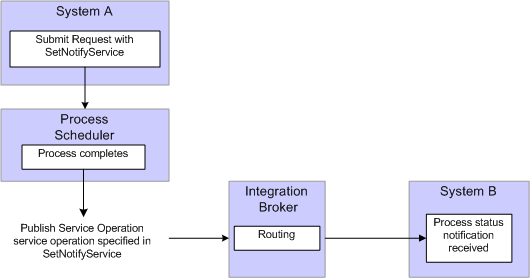
This method requires you to create your own service operation and service operation handler to publish the message when the process request completes.
This example illustrates how to create service operation and service operation handler to publish messages.
To use this method:
-
Create a service operation and service operation handler to handle the notification. The service operation must use the message definition PRCS_STATUS_MSG.
Note:
This service operation and all its related metadata, such as message and handler classes must be on all participating systems. You can create a project in Application Designer and migrate the definitions.
-
Include SetNotifyService using the service operation created in step 1 in the process request.
-
Optionally, include AddNotifyInfo in the process request.
-
Add an outbound routing to the service operation you created in step 1 pointing to your remote system.
-
On the remote system add an inbound routing to the service operation you created in step 1.
See PeopleCode API Reference: SetNotifyAppMethod method: ProcessRequest class, PeopleCode API Reference: SetNotifyService method: ProcessRequest class, PeopleCode API Reference: AddNotifyInfo method: ProcessRequest class.