Setting Notification Options
To access the Notification page, select
This example illustrates the fields and controls on the Notification page. You can find definitions for the fields and controls later on this page.
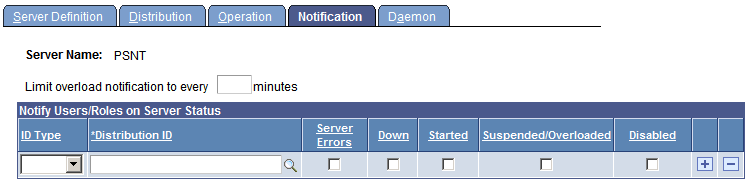
Use the Notification page to send messages to a group (role ID) or individuals (user ID) when an activity occurs with the server, such as an error or shutdown.
| Field or Control | Description |
|---|---|
|
Limit overload notification to every n minutes |
Enter the schedule for sending notification email when the server is overloaded. |
|
ID Type |
Select User or Role. |
|
Distribution ID |
Select the actual user ID or the group of users. |
|
Server Errors |
Select to notify the user or group when an error occurs. When this is selected, error notification for processes or jobs will be sent when a process or job goes to Error. This setting does not generate success or warning notifications. Success or warning notifications have to be individually configured in the process or job definition. |
|
Down |
Select to notify the user or group when the server shuts down. |
|
Started |
Select to notify the user or group when the server is started. |
|
Suspended/Overloaded |
Select to notify the user or group when activity on this server is suspended or overloaded. Notification is only sent when CPU utilization or the memory utilization is exceeded. |
|
Disabled |
Select if you do not want to send notifications to the user or group. |
Server Notification Examples
If you enter an ID Type and Distribution ID, then—depending on the check boxes selected—notifications will be sent to the appropriate roles or users. Notifications are sent based on the Limit overload notification to every n minutes value. If this field is left blank, the process scheduler server sends a notification every cycle. If a value is entered, the notification is sent every n minutes. This table provides examples of the notifications sent based on the check boxes selected:
| Check Box Selected | Notification Sent When | Notification Message |
|---|---|---|
|
Server Errors |
A process by the server goes to error. |
Message example: The Process Instance (252 - Process (XRFWIN) failed to complete successfully) |
|
Down |
Process Scheduler is shut down. |
The Process Scheduler Server Agent <process scheduler server name> for database <database name> was shut down in server <machine name>. |
|
Started |
Process Scheduler is started. |
The Process Scheduler Server Agent <process scheduler server name> for database <database name> was started in server <machine name>. |
|
Suspended/Overloaded |
Either CPU Utilization Threshold or Memory Utilization (as specified in Server Definition page) is exceeded. Note: The only time the process scheduler is suspended is when it is suspended from the Process Monitor page. Suspending the process scheduler does not generate an email notification. |
Process Scheduler Server Agent <process scheduler server name> has exceeded the CPU Threshold. |
|
Disabled |
No notification is sent to this Distribution ID. |
Not applicable. |