Setting Options for JobSet Items
To access the Schedule JobSet Items page, select
This example illustrates the fields and controls on the Schedule JobSet Items — General page with processes expanded. You can find definitions for the fields and controls later on this page.
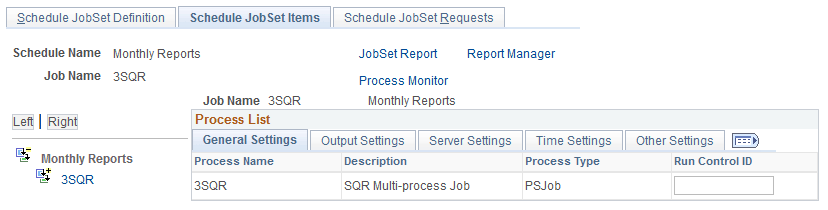
If the output options were specified at the main JobSet level, then these options apply to all items of that job. You can specify options for individual jobs and processes on this page. These options override the output options that are specified for the parent job. You can also set up distribution details from this page.
This page lists each individual process that is contained in the jobs and JobSet and displays a hierarchical view of the processes.
This section discusses how to specify:
-
General settings.
-
Output settings.
-
Server settings.
-
Time settings.
-
Other settings.
Specifying General Settings
To specify individual general settings:
-
Select the General Settings tab.
-
Enter run control IDs for the required jobs and processes.
Specifying Output Settings
To specify individual output settings:
-
Select the Output Settings tab.
-
Select the output type and format for the required jobs and processes.
-
Click the Distribution link for required processes to enter distribution detail information.
You must specify an output type of Web, Window, or Email for the distribution list to be accepted when the PSJob is created.
Important:
The distribution list is based solely on the information specified for individual processes within the JobSet. Do not enter distribution information in the job header. If the JobSet has no distribution lists, the requester will be the only recipient of the reports.
Specifying Server Settings
To specify individual server settings:
-
Select the Server Settings tab.
-
Select the server option for the required jobs and processes:
-
Any Server
-
Primary Server
-
Specific OS
-
Specific Server
-
-
Select the required server if the server option is Primary Server or Specific Server.
-
Select the required operating system if the server option is Any Server or Specific OS.
Note:
A Master Scheduler is required to be up and running if you want to distribute the workload across multiple Process Schedulers.
Specifying Time Settings
To specify individual time settings:
-
Select the Time Settings tab.
-
Select the runtime option for the required jobs and processes:
-
Job Rule Time
-
Specific Time
-
-
Enter the run time and estimated CPU time if the runtime option is Specific Time.
Specifying Other Settings
To specify individual other settings:
-
Select the Other Settings tab.
-
Click the Notification link for required jobs and processes to enter notification detail information.
Note:
Only notification information entered in the JobSet will be in effect. Once Process Scheduler detects notifications in any of the items of the JobSet, it will ignore any notification information found in the Job Definition and Process Definition.
-
Click the Messages link for required jobs and processes to enter message detail information.
Note:
Only message information entered in the JobSet will be in effect. Once Process Scheduler detects messages in any of the items of the JobSet, it will ignore any message information found in the Job Definition and Process Definition.
-
Click the Parameters link for required jobs and processes to enter values for the process parameters.
Note:
Each process within the jobset has its parameters defined as part of either its Process Type Definition (Parameter list) or Process Definition Override Options.