Setting Up Process Scheduler to Run the POSTRPT_DMN Program
This section discusses the steps required to activate the POSTRPT_DMN program from any Process Scheduler server. When a Process Scheduler server is activated to have the POSTRPT_DMN program run through PSDAEMON, the program checks for any new XML files in the <PS_HOME>\appserv\prcs\<Database Name>\files\reports directory.
Note:
For the changes to take effect, you must reboot the Process Scheduler server.
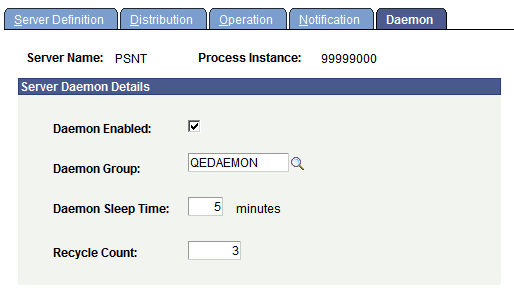
This example illustrates the fields and controls on the Process Scheduler - Servers - Daemon page.
To set up a Process Scheduler server to run the POSTRPT_DMN program in PSDAEMON:
-
Go to .
-
Add a new Daemon Group.
For example, add QEDAEMON. The Daemon Group page appears.
-
Use the drop-down list to add the POSTRPT_DMN program, and click Save.
-
Select PeopleTools, Process Scheduler, Servers.
-
Select the server definition for the Process Scheduler server on which you intend to run the POSTRPT_DMN program.
-
Go to the Daemon page and complete the information as shown in the example that precedes these instructions.
-
Click Save.
Related Topics