Updating Partition
Access the Partition Manager page () to modify the parameters for process scheduling.
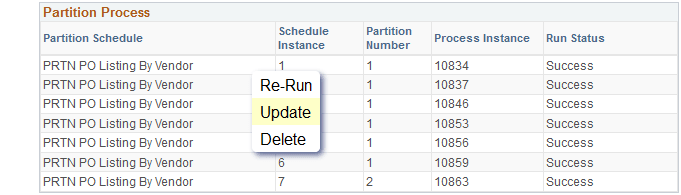
This example illustrates how you can update a partition process on the Partition Manager page.
-
From the Partition Process section, select the partition process row that you want to update.
-
Click Update from the list to access the Detail PO Listing page.
-
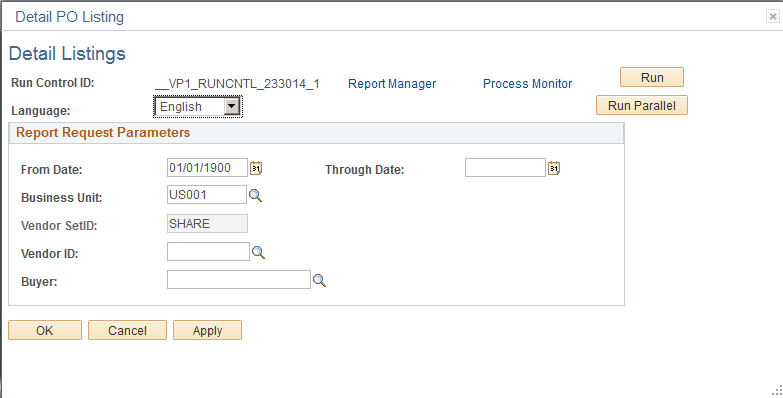
On the Detail PO Listing page, enter the relevant details.
This example illustrates the fields and controls on the Detail PO Listing page.
Field or Control Description Run Control ID
Specify the run control ID that is used as a key (with a user ID) for records that contain the parameters that a process needs at runtime.
Report Manager
Click this to access the Report Manager page to view all the reports that you are authorized to view.
See Viewing Reports.
Process Monitor
Click this to view the run status of a scheduled request.
Run
Executes the schedule.
Run Parallel
Executes parallel processing.
Language
Select a language for the report.
From Date
Specify the from date.
Through Date
Specify the end date of the report.
Business Unit
Select a business unit. You can choose run a report for multiple business units.
Vendor SetID
Specify the vendor set identifier.
Vendor ID
Specify the vendor ID.
Buyer
Specify the buyer.
-
Click Save.