Choosing a Layout Type
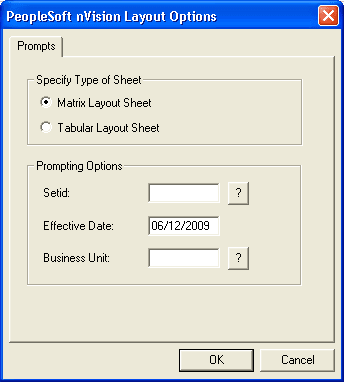
When you first create a new layout, the type – matrix or tabular – is not yet defined. You use the PeopleSoft nVision Layout Options dialog box to specify the layout type.
This example illustrates the fields and controls on the PeopleSoft nVision Layout Options dialog box.
To specify a layout type in PS/nVision:
-
Select from the nVision menu.
The PeopleSoft nVision Layout Options dialog box appears.
-
Select either the Matrix Layout Sheet option or the Tabular Layout Sheet option.
-
Enter a setID, effective date, and business unit.
A setID identifies the table set you want to work with and corresponds to the set control value used in establishing table set sharing within the PeopleSoft database.
The effective date determines which values in PeopleSoft tables are valid at the time you develop the report. The effective date is not the same as the as of date that is entered in the report request. (The as of date determines the current period for data retrieval.)
The business unit represents part of your corporation that is independent with regard to one or more operational or accounting functions. PeopleSoft General Ledger business units typically comprise individual entities for accounting purposes.
Note:
The values you enter here do not determine the setID and effective date used for the reports—runtime controls are specified on the report request. Instead, PS/nVision uses the setID and effective date you enter here to determine the data you can select from while creating your layout.
-
Click the OK button.
The nVision Layout Definition dialog box appears prompting you to define your layout further.