Understanding PS/nVision Ledger-Based Data Security
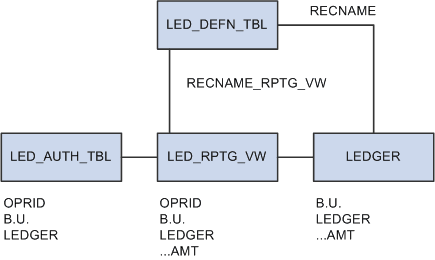
With PS/nVision row-level ledger security, you can restrict access to specified rows of ledger data. PS/nVision employs a view that joins an Authorization table (maintained by you through a page) with the Ledger table to select the rows a user is authorized to see. You can set up an Authorization table based on any ChartField.
When you define a ledger, you specify the physical table that stores the ledger data in the database. You can also define a record (view) for reporting purposes. If you define a reporting view, PS/nVision uses this record in place of the physical Ledger table. By joining the Ledger table with the Authorization table, the user only sees the rows that they’re authorized to see.
This diagram illustrates the PS/nVision security customization.