Using the Reporting View
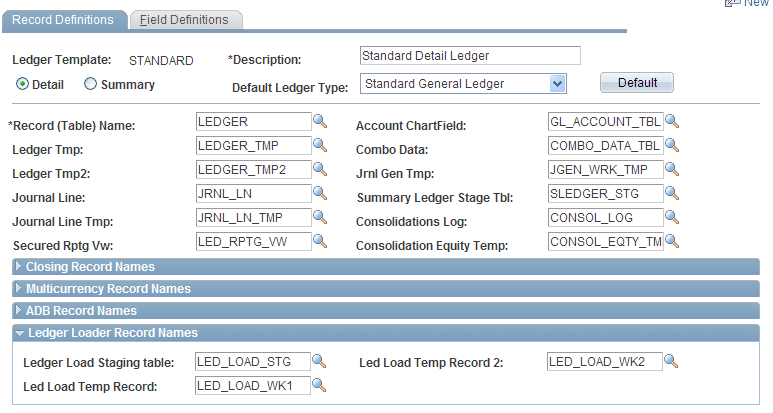
The reporting view, like the Ledger table, is named on the Ledger template in the Secured Rptg Vw (Secured Reporting View) field.
To open the Ledger template, select
In the following example, this view (LED_RPTG_VW) is defined as:
SELECT A.OPRID, L.BUSINESS_UNIT, L.LEDGER, L.ACCOUNT,...
FROM PS_LEDGER L, PS_AUTH_TBL A
WHERE L.BUSINESS_UNIT = A.BUSINESS_UNIT
  AND L.LEDGER = A.LEDGER
Example of the Record Definitions page that displays the Ledger Template and the Secured Rptg Vw field.
Normally, the view includes all the columns in the Ledger table, plus the OPRID field, but you are not required to include all ledger columns. The OPRID field is defined as a key to the view. Reporting views can be defined differently for different ledgers. The OPRCLASS or ROWSECCCLASS fields, or any combination of the OPRID, OPRCLASS, and ROWSECCLASS fields can be used instead of the OPRID field. In the user profile found in PeopleSoft Security, you can use the OPRID field as the user ID, the OPRCLASS field as the primary permission list, and the ROWSECCLASS field as the row-level security permission list for the user.
With this example view, only users that belong to the specified OPRID, OPRCLASS, or ROWSECCLASS from the LED_AUTH_TBL can see those business units and ledgers.
The application provides a template Authorization table and Reporting view. By changing the definition of the view and the underlying Authorization table, you can revise the security to be at the department level or any other ChartField. The personalized view can use BETWEEN, OR, and LIKE statements to implement more flexible (though less efficient) security views.
For example, you could add DEPT_FROM and DEPT_TO to the Authorization table. Each user would have access to all departments that fall within the ranges for their user ID and role. The Reporting view could include:
WHERE ... L.DEPTID BETWEEN A.DEPT_FROM AND A.DEPT_TOThis setting might carry a performance cost on some database platforms, but it can ease the process of maintaining the Authorization table, all transparent to PS/nVision.
Changes to the view are made using Application Designer. Changes to authorizations are made through a page that maintains authorized ChartField values for each user. No changes are required to PS/nVision.
To ignore security on a ledger, leave the Secured Rprt Vw (Secured Reporting View) field on the Ledger Definition page blank. PS/nVision will access the base ledger record.