Creating Record Hierarchy Joins
A record hierarchy join joins a parent table to a child table. (A child table is a table that uses all the same key fields as its parent, plus one or more additional keys.)
Note:
You can specify the parent/child relationship using the Parent Record Name option in PeopleSoft Application Designer.
This example shows how to perform hierarchy joins with the ABSENCE_HIST record is selected.
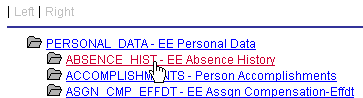
To create a record hierarchy join:
-
In Query Manager select the base record for your query.
-
Select the appropriate fields and criteria.
-
From the Query page, click the Hierarchy Join link.
All of the records that have a parent/child relationship with your selected record appear.
-
Select the second record for the join.
The join is reflected on the Query page.