Opening Existing Queries
Use Query Manager component to open and view queries.
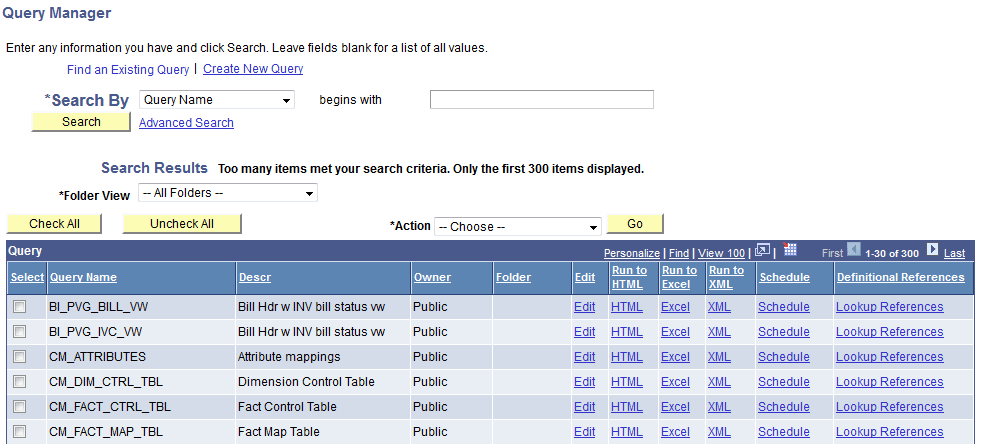
This example illustrates the fields and controls on the Query Manager search results page.
To open an existing query from your browser:
-
Select
The Query Manager search results page appears.
-
Search for a query using the basic or advanced search functions.
Both search types enable you to select from the following search by criteria: access group name, description, folder name, owner, query name, type, uses field name, and uses record name. The basic search enables you to search using the begins with condition. The advanced search enables you to perform a progressively narrower search using one or more search by criteria and selecting from a choice of conditions for each search by criterion.
The following list provides instructions on using search by criteria:
-
To perform a basic search by name, enter the name of the query in the Search By field and click the Search button.
If you do not know the name of the query and want to search through a list of queries, leave the Search For field blank and click the Search button to display a list of up to 300 queries.
Perform a partial search by entering part of a query name or description in the Search By field. Use the drop-down list to search queries by either name or description, and then click the Search button to display a list of queries that match your search criteria.
The Search Results page appears and lists all the queries that match the search criteria. The following information appears: query name, query description, and ownership (public or private).
-
If you know the name of the query that you want, enter it in the Search By field and click the Search button.
-
To perform an advanced search, click the Advanced Search link.
On the advanced search page, select the appropriate search by criteria and conditions and enter a search string in each of the corresponding fields. Then click the Search button to display a list of queries that match your search criteria. The Search Results page appears listing the query name, description, owner, and folder for all the queries that match the search criteria.
-
-
Click the Edit link on the row of the query that you want to modify.
Related Topics