Specifying Composite Query Properties
Use the Specify Composite Query Manager page (PSCPQINFO) to specify composite query properties.
Navigation:
-
Select Reporting Tools, Composite Query, Composite Query Manager.
-
Select the Add a New Value tab to add a new composite query.
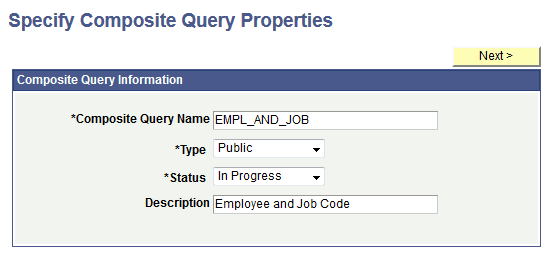
This example illustrates the fields and controls on the Specify Composite Query Properties page. Definitions for the fields and controls appear following the example.
| Term | Definition |
|---|---|
|
Composite Query Name |
This is a required field. Enter a unique name for the composite query. Note: The name of the composite query cannot be changed after you enter the name into the Specify Composite Query Properties page. |
|
Type |
Select whether the composite query is Private or Public.
|
|
Status |
Select the status of the composite query. The available options are In Progress, Active, or Inactive. Note: Currently, composite queries do not apply the status logic based on the value set in this field; the status logic will be applied to the composite queries in future PeopleTools releases. |
|
Description |
This is an optional field. Enter a description for the composite query. |
|
Next |
Click to advance to the Select Base Query page. |