Using the OrderBy Processing Option
The PeopleCode-based Preview XML and C++ based traditional CQRuntime run each child query multiple times based on data rows that the parent query returns, so the Connected Query application runs the child SQL statement for every parent row with the different bind values. These two running options make the Connected Query application a universal solution that enables users to map multiple queries together without limiting the resulting object structure. Connected Query enables users to map fields between different queries, provide a number of nesting levels, and so on. If the OrderBy run-time optimization is not used, these two running options run plenty of SQL statements that could affect your system performance. The number of generated SQL statements depends on the number of nested levels and on the number of data rows that are returned by higher level queries. The following example describes the difference in executions with and without using of the OrderBy processing option.
Suppose that the connected query EMP_ADR consists of these two hierarchical queries that are linked by the field EMPL_ID:
EMP_DET (Level 0)
	 EMP_ADDRESS (Level 1)
Applying the PeopleCode-based Preview XML and C++ based CQRuntime options, each of the above queries performs a SELECT from a single table. Connected Query application generates the following SQL statements:
Level 0: SELECT EMPLID, NAME FROM EMP_DET
	 Level 1: SELECT EMPLID, ADDRESS FROM EMP_ADDRESS WHERE EMPLID=:1
In the previous SQL statements, Level 1 query (EMP_ADDRESS) runs for every row returned from the Level 0 query (EMP_DET) using a bind variable that is dynamically substituted with the EMPLID field value being returned from the Level 0 query.
If you apply the OrderBy Processing option, both queries are dynamically altered to include the ORDER BY clause, and the Connected Query application generates the following SQL statements:
Level 0: SELECT EMPLID, NAME FROM EMP_DET ORDER BY EMPLID
	 Level 1: SELECT EMPLID, ADDRESS FROM EMP_ADDRESS ORDER BY EMPLID
In the previous SQL statements, every SQL statement runs once. The data set being generated is created by the associated code that processes child query rows based on a concatenated set of related field values being returned from a parent query.
Note:
Not all queries in the Connected Query application can apply the OrderBy processing option.
To use the OrderBy processing option, each query with the OrderBy processing turned on should meet the following requirements:
-
Parent and child queries must have one-to-many relationships.
Every row of the related field values of the parent query can correspond to none, one, or many rows of child query data with the same set of related field values. Every row of the related field values of the child query can have only one row of parent data for the same set of related field values.
For example, query DEPARTMENT is linked to query EMPLOYEE by the related field DEPTID. Each department has one or more employees, and each employee works in a single department, which is a one-to-many relationship. You can use the OrderBy processing option for this structure if DEPARTMENT is a Level 0 query and EMPLOYEE is a child query. However, if query EMPLOYEE is set at Level 0 and query DEPARTMENT is set as a child query, then you cannot use the OrderBy processing option because multiple employees work in a department, and that is a many-to-one relationship.
In another example, a connected query has query JOB and query EMPLOYEE, and these queries are joined by the JOB_ID field. You can use the OrderBy processing option if:
-
JOB_ID is assigned to multiple employees and
-
Each employee has only one JOB_ID.
However, you cannot use the OrderBy processing option if:
-
JOB_ID is assigned to multiple employees and
-
Each employee has multiple JOB_ID assignments.
-
-
All child queries (sibling queries) that have the same parent query must share the same set of related fields.
For example, assume that a connected query has the following structure:
DEP_EMP (Level 0)
		EMPL (Level 1)
		EMPL_DETAILS (Level 1)
You can use the OrderBy processing option if:
-
DEP_EMP query is linked with EMPL query by the EMPL_ID field and
-
DEP_EMP query is linked with EMPL_DETAILS query by the EMPL_ID field.
You cannot use the OrderBy processing option if:
-
DEP_EMP query is linked with the EMPL query by the EMPL_ID field and
-
DEP_EMP query is linked with the DEP_DETAILS query by the DEPTID field.
-
-
Child queries that constitute a single hierarchy should be joined by the same set of related fields as their parent and any other fields.
For example, assume that a connected query has the following structure:
DEP_EMP > EMPL > EMPL_ADDRYou can use the OrderBy processing option if:
-
DEP_EMP query is linked with the EMPL query by the EMPL_ID field and
-
Query EMPL is linked to the EMPL_ADDR query by the related fields EMPL_ID and ADDRESS_ID.
-
-
Related fields that are identified as parent and child query relationships must follow the same field order in each query.
-
Parent queries on any level should not be restricted to the amount of data they return if the same restrictions do not exist for their child queries.
Note:
This rule is not required, but it is highly recommended.
If the parent query limits the number of rows that are returned by any filter (for example, the WHERE clause) in the query and the child query does not use this filter; then Connected Query performance may be less efficient.
If the parent query uses a prompt to limit the amount of data returned, you should add the same prompt to the child query to eliminate extra string processing and improve processing time.
Note:
To improve Connected Query performance when creating a connected query, report developers should compare the Connected Query results by running connected queries using the traditional execution algorithm and the OrderBy processing options. It is recommended that Connected Query developer sets the connected query property ExecutionLog to True to analyze the results, and then use the OrderBy processing option only if both processing options return the same number of nodes and improve processing speed.
Setting the SupportsOrderBy Property
To set the SupportsOrderBy property:
-
Select Reporting Tools, Connected Query, Connected Query Manager.
-
Open an existing query and click the Properties button.
-
Select the True option from the Property Value list for the SupportsOrderBy property.
-
Click the OK button to return to the Connected Query Manager page.
The Use 'Order By' processing column is available in the Connected Query Structure section.
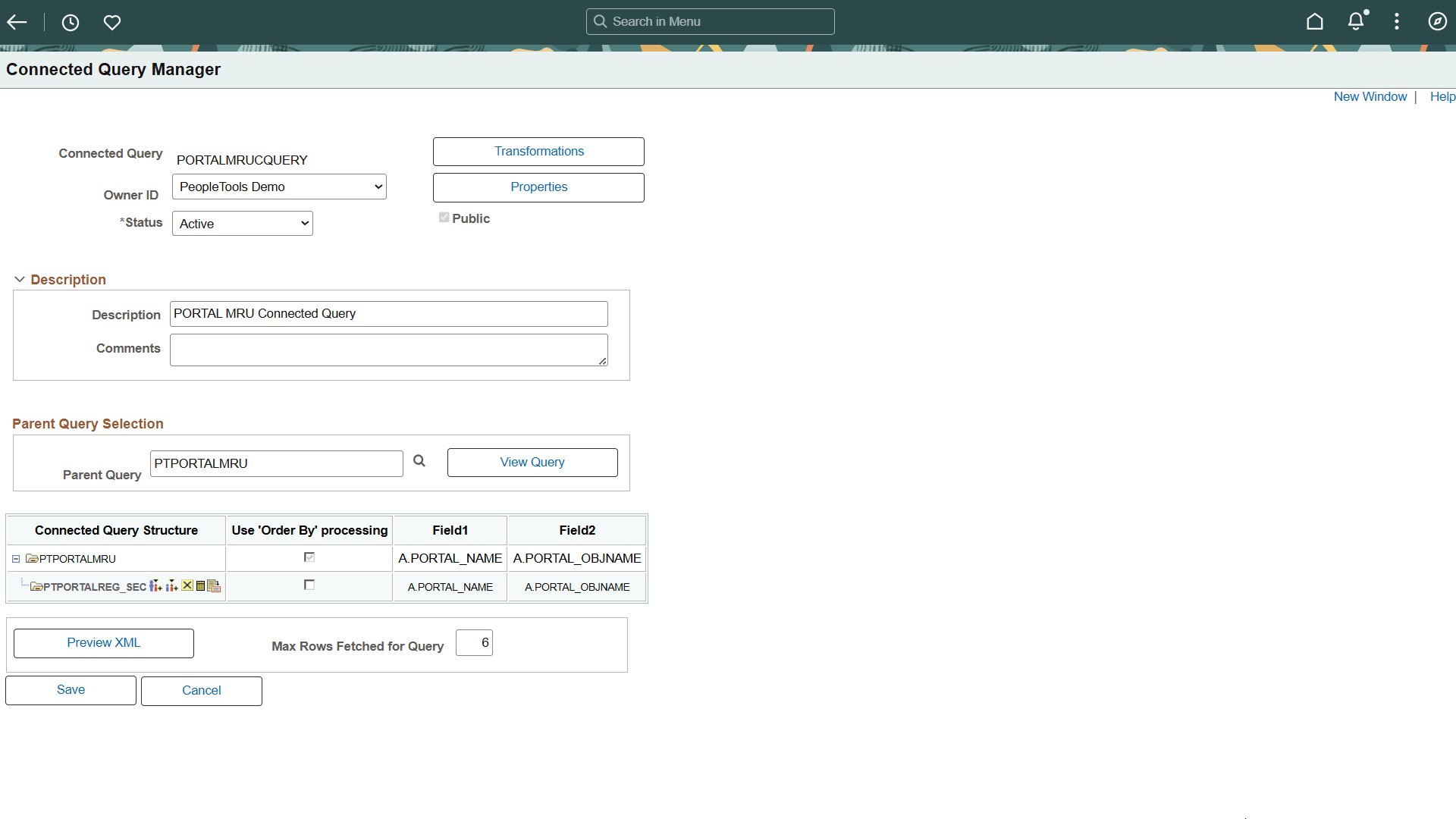
In this example, the Use ‘Order By’ processing option for the first query PSMENUDEFN is always selected and you cannot modify it. The Use ‘Order By’ processing options for the following queries become active when you click the query name in the Connected Query Structure column.
If you reopen the Connected Query Property page and set the SupportsOrderBy property to False, then the Use ‘Order By’ processing column is not available in the Connected Query Manager page. If you later set the SupportsOrderBy property back to True, the system will display the processing option that you previously selected.
Note:
The OrderBy processing option is not applied if the connected query is running in the Preview XML mode.
-
Select the appropriate options in the Use ‘Order By’ processing column.
If the Use ‘Order By’ processing option is selected for a specific query (for example, PSMENUITEM), then:
-
The parent query (in this example, PSMENUDEFN) SQL will be modified by adding the ORDER BY clause. Data returned from the parent query will be ordered using a set of related fields defined to link a child query to its parent. In this example, it is the field A.MENUNAME.
-
If the parent query (PSMENUDEFN) has an existing ORDER BY clause defined inside the query definition, it will be removed and replaced with the ORDER BY clause being generated by the processor.
-
A single SELECT statement based on a query definition will be issued for a child query (PSMENUITEM) with NO FILTERING based on related field values received for a parent query.
-
Output XML data will be written row by row for a child query with a reference to the data that is returned from related fields used for a parent query.
-
-
Click the Save button.
When the SupportsOrderBy property is set to True and you click the Save button on the Connected Query Manager page, the following validation are performed:
-
If all members of the connected query have their related fields defined?
This validation is performed for the CQRuntime with or without the OrderBy processing option.
-
If each parent query is already ordered by another child and the OrderBy sequence of the fields is not the same for the different child siblings, this message appears noting the bind variables are being replaced with the run-time values: "User selected field %1 in query %2 conflicts with user selected field %3 used in query %4."
-
If all related fields being used in the OrderBy processing option include data type other than NUMBER, CHAR, DATE, DATETIME or TIME, this message appears: "Cannot use 'OrderBy' processing on query %1 as field %2 has unsupported data type.”
-
If any related field being used in the connected query structure does not exist in the Select List of the correspondent query, this message appears: "Cannot use 'OrderBy' processing on query %1 as related field %2 is not used in query %3 select list."
-
If any related field being used in the connected query structure does not exist in the correspondent query, this message appears: "Cannot use 'OrderBy' processing on query %1 as related field %2 does not exist in the query %3."
-
Note:
If an error message appears, the connected query is not saved. You should evaluate the use of the OrderBy processing option on each query or on the connected query, and then save the connected query again.