Setting Connected Query Properties
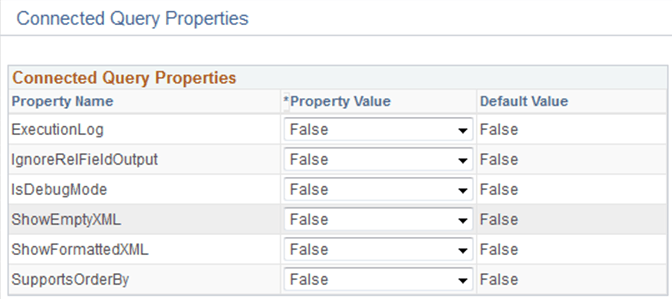
Report developers use the Connected Query Properties page (PSCONQRSPROP) to associate a set of properties with a connected query definition, modify values of execution or output XML file based on user-selected properties, and ensure that user-selected properties (with PeopleTools projects) are compatible with PeopleTools 8.50 and later releases.
Navigation:
-
Select
-
Select the Add a New Value tab, or click the Edit link.
-
On the Connected Query Manager page, click the Properties button.
This example illustrates the fields and controls on the Connected Query Properties page. You can find definitions for the fields and controls later on this page.
| Field or Control | Description |
|---|---|
|
ExecutionLog |
The valid values are:
If ExecutionLog is set to True, an execution log is recorded in an appropriate log file. Recording includes regular logging and output statistics section. |
|
IgnoreRelFieldOutput |
The valid values are:
If IgnoreRelFieldOutput is set to True, the output XML file will not repeat mapped field nodes that are associated with a child query. For example, if a parent query has a field DEPTID linked to the child query field DEPARTMENT, node DEPARTMENT will not appear in the XML output file. |
|
IsDebugMode |
The valid values are:
If IsDebugMode is set to True, an execution log is recorded in an appropriate log file. Recording includes regular logging and output statistics section. In addition, if application server executes the connected query (for example, PreView XML), the True mode preserves a directory that contains temporary files after a connected query is executed. Log also contains SQL statement that is generated by each member query as well as values of related fields used to link parent query to its child. |
|
ShowEmptyXML |
The valid values are:
Set the property to True to generate an empty XML data file when a connected query does not retrieve data while running the parent query. You can override this value for a specific connected query using the Connected Query Manager page. If this property is set to True and a connected query is being used as a data source for a BI Publisher report, an empty report is generated. |
|
ShowFormattedXML |
The valid values are:
Available options are True and False (default). If ShowFormattedXML is set to True, an output XML file will contain node indentations used to format XML. This output is used for XML output shown in the Connected Query Quick Start. You should set the SHOWFORMATTEDXML property to True if you want to use non-XML editors to work with output XML files. However, if you set the SHOWFORMATTEDXML property to False (default option), the output files will be smaller. |
|
SupportsOrderBy |
The valid values are:
|
Note:
You define all connected query properties as strings using the name-value pairs concept. These properties are stored in database-managed tables as a part of the connected query definition.
You can preview a connected query XML without storing its properties in the database.
If you move the mouse pointer to the Help icon (question mark), a pop-up window appears showing detailed information about all properties.