Viewing and Editing Selection Criteria
Use the Criteria page (QRY_CRITERIA) to view and edit selection criteria for your query statement.
Navigation:
This example illustrates the fields and controls on the Criteria page. You can find definitions for the fields and controls later on this page.
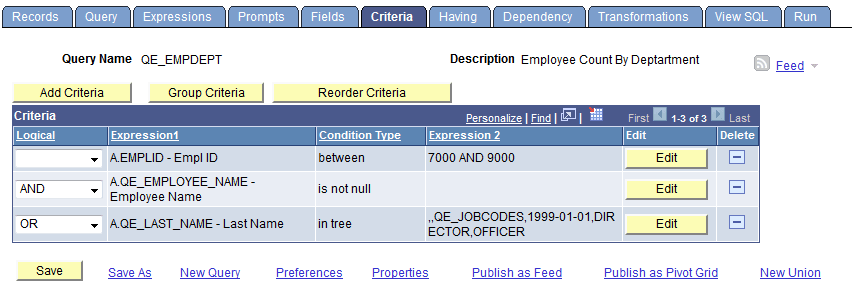
| Field or Control | Description |
|---|---|
|
Add Criteria |
Click to access the Edit Criteria Properties page, where you can add additional criteria for the query. |
|
Group Criteria |
Click to access the Edit Criteria Grouping page, where you can group your criteria logically. |
|
Reorder Criteria |
Click to access the Edit Criteria Ordering page, where you can reorder the criteria for your query. |
|
Logical |
Any rows after the first row must include either an AND or OR logical value in the Logical column to specify whether you want the rows to meet this criterion in addition to other criteria that you have defined or as an alternative criterion. The first criterion that you define does not have a value in this column. The default for subsequent criteria is AND. |
|
Edit |
Click to access the Edit Criteria Properties page, where you can edit the existing criteria for the query. |