Creating a Query
QAS provides several service operations that can be used by an external application to access the PeopleSoft application database to select records and fields to create a valid PeopleSoft Query. Creating a query involves several steps, some of which do not require access to the PeopleSoft records, fields, and trees and therefore do not have associated service operations.:
This diagram illustrates the steps and corresponding service operation that can be used to access the PeopleSoft database information.
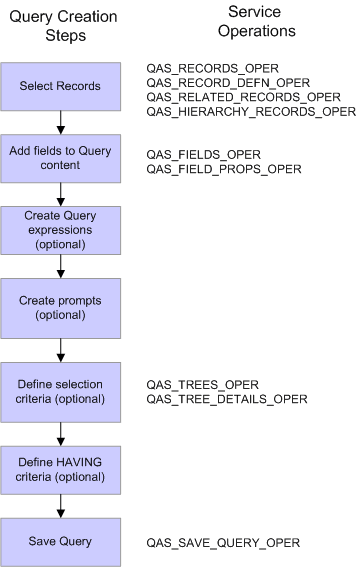
You can use QAS_RECORDS_OPER, QAS_RECORD_DEFN_OPER, QAS_RELATED_RECORDS_OPER, and QAS_HIERARCHY_RECORDS_OPER to select records.
QAS_FIELDS_OPER and QAS_FIELD_PROPS_OPER can be used to help select the fields and prompts to add to the query content.
QAS_TREE_OPER and QAS_TREE_DETAILS_OPER can be used when your selection criteria uses trees.
The QAS_SAVE_QUERY_OPER is used to save a query definition to the PeopleSoft database.