Executing a Query
To execute an existing query in the PeopleSoft database, the external application will use Query Metadata Services, Query Execution Services, and possibly the Query Result Service. This diagram illustrates the steps and corresponding service operations that can be used to execute a PeopleSoft query and retrieve the results:
This diagram illustrates the steps and corresponding service operations that can be used to execute a PeopleSoft query and retrieve the results
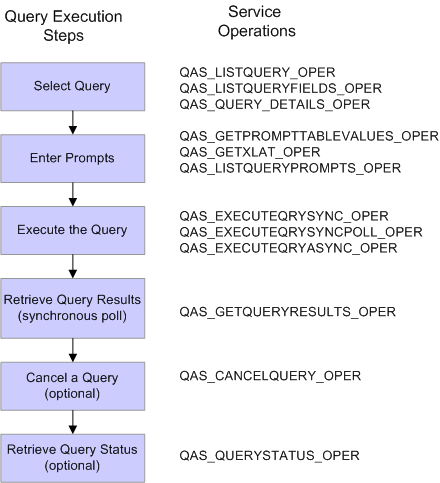
To execute a query, you will need to know the query name. QAS_LISTQUERY_OPER, QAS_LISTQUERYFIELDS_OPER, and QAS_QUERY_DETAILS_OPER can be used to help select the query name.
For queries containing prompts, use QAS_GETPROMPTTABLEVALUES_OPER, QAS_GETXLAT_OPER, and QAS_LISTQUERYPROMPTS_OPER to identify the prompts and obtain a list of values.
You can also filter fields to be retuned in the query results using QAS_LISTQUERYFIELDS_OPER.
You can select how you want to execute the query and use the appropriate service operation.
For synchronous poll execution, you will use QAS_GETQUERYRESULTS_OPER to retrieve the results.
You can invoke QAS_CANCELQUERY_OPER after obtaining the query result to clean up the PSQASRUN and IB tables.
You can check the query status using QAS_QUERYSTATUS_OPER.