Assigning Users to a Search Instance for Validating Indexes
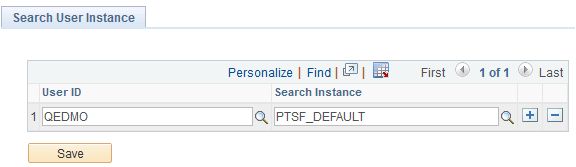
When you deploy an index on a new search instance, you may want to validate or test the index before you roll out the index in a production environment. Search administrators can use the Search User Instance page to assign users to a search instance on which the deployed index needs to be validated or tested.
Note:
When you assign a user to a search instance using the Search User Instance page, you override the priority setting specified on the Search Instance Administration page for the particular user.
To assign users to a search instance where a deployed index needs to be validated or tested, access the Search User Instance page by selecting .
This example illustrates the fields and controls on the Search User Instance page. You can find definitions for the fields and controls later on this page.
| Field or Control | Description |
|---|---|
|
User ID |
Select a user to whom you want to assign the task of validating or testing an index that is deployed. |
|
Search Instance |
Select a search instance where you have deployed an index, which needs to be validated or tested before deploying the index to a production environment. |
Note:
You would use this page to test new search instances as they come online. It does not need to be specified for all users.