Building an Index for an External Data Search Definition
Use the Manage External Search Index page to control the indexing of data from the defined data sources using Logstash. The page lists the existing data sources and enables you to schedule the index build process or immediately start or stop the indexing process.
Access the Manage External Search Index page by selecting and from the left panel choose Manage External Search Index.
Alternatively, you may select .
This example illustrates the fields and controls on the Manage External Search Index page. You can find definitions for the fields and controls later on this page.

| Field or Control | Description |
|---|---|
|
Data Source Name |
Specifies the data sources that you added on the Data Source page. |
|
Definition |
Specifies the external data search definition that you associated with a data source. |
|
Index Name |
Displays the index name for the specified external data search definition. The index name is generated when you deploy the search definition. |
|
Count |
Indicates the document count for each search definition. |
|
Created On |
Indicates the day and time when the index was built. |
|
Schedule |
Enables you to set up the time and frequency of the indexing process. The Schedule Definition page is described later in this topic. |
|
Start/Stop |
When you select Start, Logstash initiates the indexing process as per the schedule you’ve set. When you select Stop, Logstash aborts the indexing process. |
Scheduling the Indexing Process
Use the Schedule Definition page to specify the time and frequency of the indexing process, which is performed by Logstash. The scheduling information is stored in the Logstash configuration file. After setting the time and frequency schedule, you must select the Start button (on the Schedule Definition page) that initiates the indexing process as per the schedule.
Access the Schedule Definition page by selecting the calendar icon on the Manage External Search Index page.
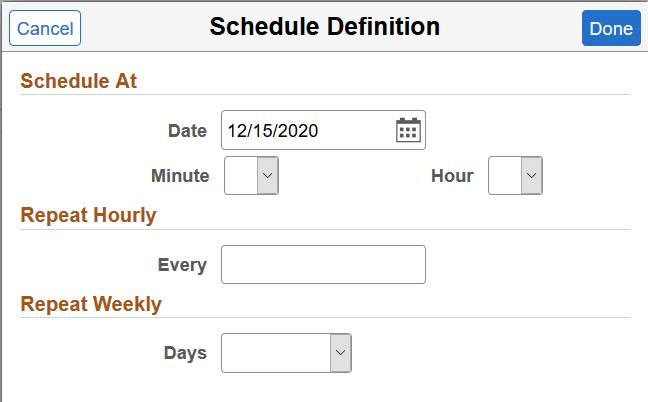
This example illustrates the fields and controls on the Schedule Definition page. You can find definitions for the fields and controls later on this page.
| Field or Control | Description |
|---|---|
|
Schedule At |
Specify the date and time when you want the index process to commence. The Schedule page provides you the flexibility to specify the exact minute to commence the indexing process. The time and frequency options are mutually exclusive. When you schedule the date and time for the indexing process, the other two frequency options are not considered and vice versa. |
|
Repeat Hourly |
Specify to repeat the indexing process by the number of hours, for example, you can set it to repeat every four hours. |
|
Repeat Weekly |
Specify to repeat the indexing process on a specific day of the week and the indexing process repeats every week on the specified day. |
Note:
The default schedule for indexing is one minute. If you do not set the time or frequency, the system runs the indexing process after one minute from the time you press the Start button. It runs only once after one minute and does not repeat.
Note:
After you’ve set the schedule and saved it, ensure that you select the Start button. The Start button initiates the indexing process as per the schedule.