Creating a Search Definition for External Data
Use the External Definition page to create a new search definition for external data and to view a list of existing search definitions for external data. You could create a search definition for each functional area, for example, recruiting, job data, and so on.
Access the External Definition page by selecting , and from the left panel, choose External Data Search Defns and select the Add Definition or plus button.
Alternatively, you may select .
To create a new definition, select the Add Definition or plus button that displays the External Definition page.
This example illustrates the fields and controls on the External Definition page. You can find definitions for the fields and controls later on this page.
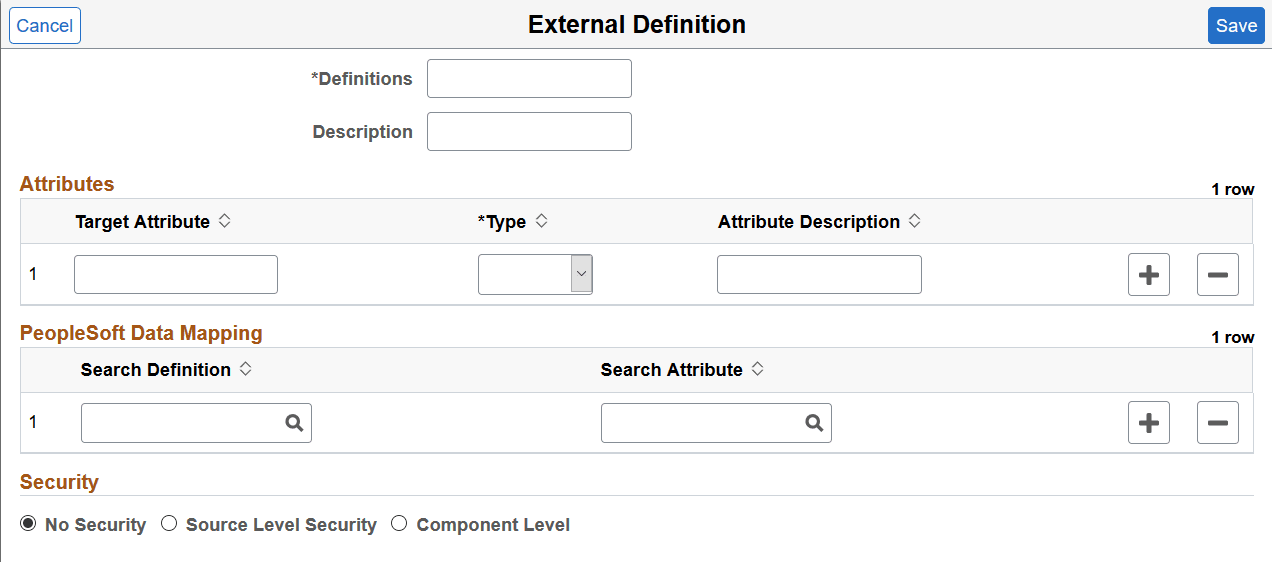
| Field or Control | Description |
|---|---|
|
Definition |
Specify a name for the search definition. |
|
Description |
Enter a description. |
Attributes
You use the Attributes section to specify the attributes which are available in the external data and are functionally relevant in the external data index. Attributes are fields that form a part of each document in the index of external data. You decide which attributes you want based on the functional information that you require in the index. These attributes can be obtained either from the external data or from PeopleSoft mapping to existing PeopleSoft fields.
| Field or Control | Description |
|---|---|
|
Target Attribute |
Enter an attribute that is available in the external data that you want to include in the index. |
|
Type |
Choose a type for each attribute. The selected type is defined in the search engine as part of the index mapping. |
|
Attribute Description |
Enter a description for an attribute. |
PeopleSoft Data Mapping
This section enables you to map some of the defined attributes with existing PeopleSoft fields. The purpose of PeopleSoft mapping is to provide fixed values per data source for each document indexed from a data source. The PeopleSoft mapping also helps to group all the documents for each data source with a specific attribute value stored in PeopleSoft.
| Field or Control | Description |
|---|---|
|
Search Definition |
Choose a search definition that has the attribute that you want to map with the external data. |
|
Search Attribute |
Choose the attribute that you want to map. |
Security
| Field or Control | Description |
|---|---|
|
No Security |
Select to define no security restriction for a search definition's data. Anyone with access to the application can view the data for a search definition set to No Security. That is, the data is public to all users. |
|
Source Level Security |
Select to allow or restrict access to the entire search definition as per the specified user or role. That is, only specified users and roles are able to view data for that search definition. Specify values for the following fields:
For more information on source level security, see Setting Source Level Security. |
|
Component Level |
Select to associate component level security with the external data search definition, that is, users who have access to a component can view the data of the external data search definition. Specify values for the following fields:
For more information on search criteria, refer to Mapping Components to Search Definitions. |