Defining Search Contexts
Access the Define Search Context page by selecting and select the Home Page search context.
This example illustrates the fields and controls on the Define Search Context page. You can find definitions for the fields and controls later on this page.
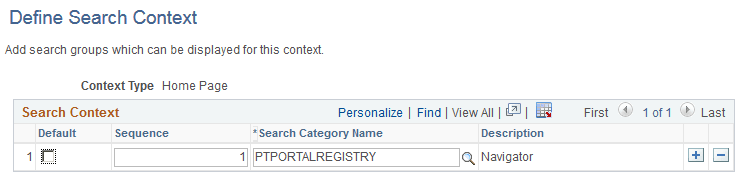
Use the plus and minus buttons to add and remove the search categories to and from the search context.
| Field or Control | Description |
|---|---|
|
Default |
Select the category that should be the default. Only PTPORTALREGISTRY related (local and remote search groups) search categories can be chosen as default. All other search categories are disabled. Only one default search category can be selected for a search context. Note: If no categories are marked as Default, then Menu is the default. If Menu is not available to be chosen, then All is the default. Note: Global Search allows searching by All allowable search categories. 'All' is an option that is automatically added to Global Search if in use. This means that users can search across all groups to which they have access. The 'All' category may not be removed. |
|
Sequence |
Specify a numerical sequence to define the order in which the search categories will appear in the Global Search Bar. Note: This sequence is considered only when the Use Search Context Sequence property in search options is set to Y. |
|
Search Category Name |
Select the search category to include for this search context. |