Error Handling
To log error messages and to handle errors in Direct Transfer, PeopleSoft Search Framework provides the following:
-
On the Search Options page, Search Framework provides the Enable Attachment Trace option to enable the detailed logging of each task on the trace file, which logs messages for search documents with attachments and search without attachments. For Direct Transfer, you should set this property to Y if you want to troubleshoot any errors associated with the transfer of search data from PeopleSoft to the search engine.
For more information, see Managing General Search Options.
-
On the Search Options page, the Max Attachment Error Count option is used to determine the error tolerance of the indexing program. For more information, see Configuration.
-
On the Build Search Index page, in the Previous schedule details section, an Error link is displayed if an error occurs while indexing ().
-
Full Direct Transfer is enabled — During indexing, there could be possibilities that certain data transactions may not be successful either due to temporary system situations (for example, the search engine is performing some internal maintenance operations) or due to data issues. In such cases, Direct Transfer stores the request and response of the transaction that goes into error in an error table, and proceeds with further indexing.
After the indexing process is complete, errors, if any, can be viewed on the Build Index page (Previous schedule details section).
-
Full Direct Transfer is disabled — During the indexing of search documents with attachments (which are transmitted directly to the search engine), if any error occurs, an Error link is displayed on the Build Search Index page.
During the indexing of search documents without attachments (which are transmitted through the Integration Gateway), if any error occurs in IB transactions, an Error link may not be displayed on the Build Search Index page. You need to check the Process Monitor whether the PTSF_GENFEED Application Engine program displays No Success status. If the status of the PTSF_GENFEED Application Engine program is No Success, administrators must review the IB monitor logs for details on the error.
-
-
Based on the type of error, an administrator can use the Rerun option to resubmit the transactions if the issue was related to temporary environment problems, or can review the data and correct the data at the source, or can determine whether the data that is causing the error can be omitted for indexing. If the data needs to be corrected at source, then the indexing process should be executed again to get the correct data indexed.
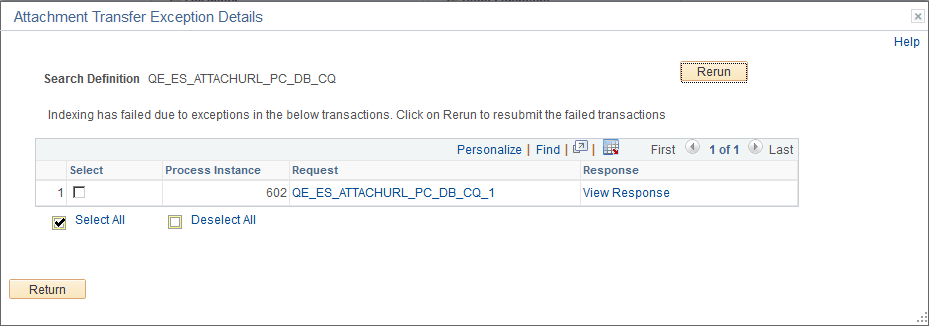
Click the Error link to display the Attachment Transfer Exception Details page.
This example illustrates the fields and controls on the Attachment Transfer Exception Details page. You can find definitions for the fields and controls later on this page.
| Field or Control | Description |
|---|---|
|
Process Instance |
The process instance ID of the PTSF_GENFEED Application Engine program that is causing the exception. |
|
Request |
The request sent by the PTSF_GENFEED Application Engine program to the search engine. |
|
Response |
The response received by the PTSF_GENFEED Application Engine program from the search engine. |
|
Rerun |
Use the Rerun button to resubmit the selected error transactions to the search engine. The progress of the transaction can be monitored using the Process Monitor page on PIA. When a transaction is successful, it is deleted from the error pages. In the case where the maximum exceptions limit is not reached, when you select the Rerun button:
In the case where the maximum exceptions limit is reached, the Rerun button acts as a re-submit of the PTSF_GENFEED Application Engine program. After re-running the PTSF_GENFEED Application Engine program, if the transaction is not successful, the error tables are updated with the latest error message. |