Setting Document Level Security
Access the document-level security settings by selecting the Document Level Security radio button. Document-level security can also be thought of as attribute-based security.
With document-level security, one or more PeopleSoft Query columns act as the security attribute. The security attribute is cached on the search engine for each document. Only those users who have the correct security attribute will have the document returned. You can then specify an application class (AppClass) that 'returns a list of security values for the current user. The Appclass is called when the user submits the search request.. When the user submits the search request, the search engine compiles a list of values returned from the application class associated with that specific user to build the security filter.
This example illustrates the fields and controls on the Security page: Document Level Security option. You can find definitions for the fields and controls later on this page.
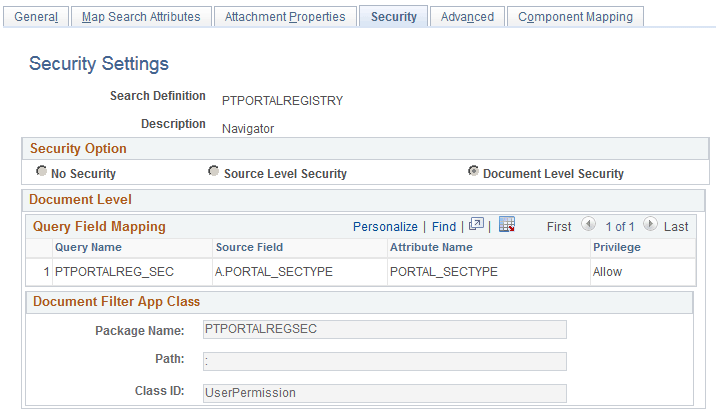
Document Level
| Field or Control | Description |
|---|---|
|
Query Name |
Select the name of the query or connected query containing the fields you want to use to restrict access. |
|
Source Field |
Select the field which will identify security values which will determine access. The source field(s) selected becomes the security attribute having the specified privilege. At indexing time, when the crawler inserts application data into the index, the values populating the selected source field(s) will carry the specified privilege. |
|
Privilege |
Define the access privilege or restriction.
Note: The privilege of Deny is useful in situations where there are too many values for the security attribute if Allow were selected. For example, rather than enabling access to nine out of ten field values, it is more efficient to deny access only to the one you want to restrict. Note: If multiple attributes appear in the grid the system effectively inserts an AND clause between the items in the grid. |
Document Filter App Class
The application class specified in the Document Filter App Class section creates a list of values for the specific user performing the query. The application class enables you to define and run additional filters and logic against the application data contained in the indexed source fields.
As needed, PeopleSoft applications will provide filtering App Classes for delivered search definitions. For any custom search definitions, or additional filtering requirements, you will need to create or modify the filtering App Classes.
| Field or Control | Description |
|---|---|
|
Package Name |
Select the name of the appropriate App Package. |
|
Path |
Select the path pointing to the App Class. |
|
Class ID |
Select the class ID for the App Class. |
For example, assume you want to compile a list of valid setIDs to which the user may have access. You define an application package that would contain a method called evaluateAttrValues. This passes the search definition name (sboName), the name of the security attribute field that was identified in the search definition, and the user who will access the data. The application method would then build a list of valid values for that user and return it to search engine for comparison against the data to see if the attribute value on the data matches.
method evaluateAttrValues
   /+ &sboName as String, +/
   /+ &secAttr as String, +/
   /+ &srchUser as String +/
   /+ Returns Array of String +/
   /+ Extends/implements PTSF_SECURITY:SearchAuthnQueryFilter.evaluateAttrValues +/
   Local array of string &secValues;
   Local string &Role, &userPref, &csFullAccess, &csAdminAccess, &OnBehalfOf,
   &docOwner, &BU_Security, &Security_Type, &SID_Security, &PermList;
   Local SQL &sqlRoles, &sqlUserPrefs, &sqlDocOwners;
   &secValues = CreateArrayRept("", 0);
      /*&BU_Security, &Security_Type, &SID_Security*/
      SQLExec("Select SETID_SECURITY, SECURITY_TYPE
      from PS_INSTALLATION_FS ", &SID_Security,
      &Security_Type);
      If &SID_Security = "N" Then
         &secValues.Push("A:ALL");
      Else
         Evaluate &Security_Type
         When "N"
            &secValues.Push("A:ALL");
         When "O"
            &secValues.Push("U:" | &srchUser);
         When "C"
            SQLExec("Select OPRCLASS from PSOPRDEFN where OPRID = :1",
            &srchUser, &PermList);
            &secValues.Push("P:" | &PermList);
         End-Evaluate;
      End-If;
End-method;
Note:
Concatenating multiple
attribute values using a separator, you can achieve an OR clause between
attributes. For example, in the this sample "A:ALL" and "U:"|&srchUser are two different attributes merged into a single attribute to achieve
the OR clause.
Note:
To achieve improved performance, the security attribute should be chosen in such a way that no more than 50 values are returned per user per attribute.