Setting Document Level Security
Access the document-level security settings by selecting the Document Level Security radio button. Document-level security can also be thought of as attribute-based security.
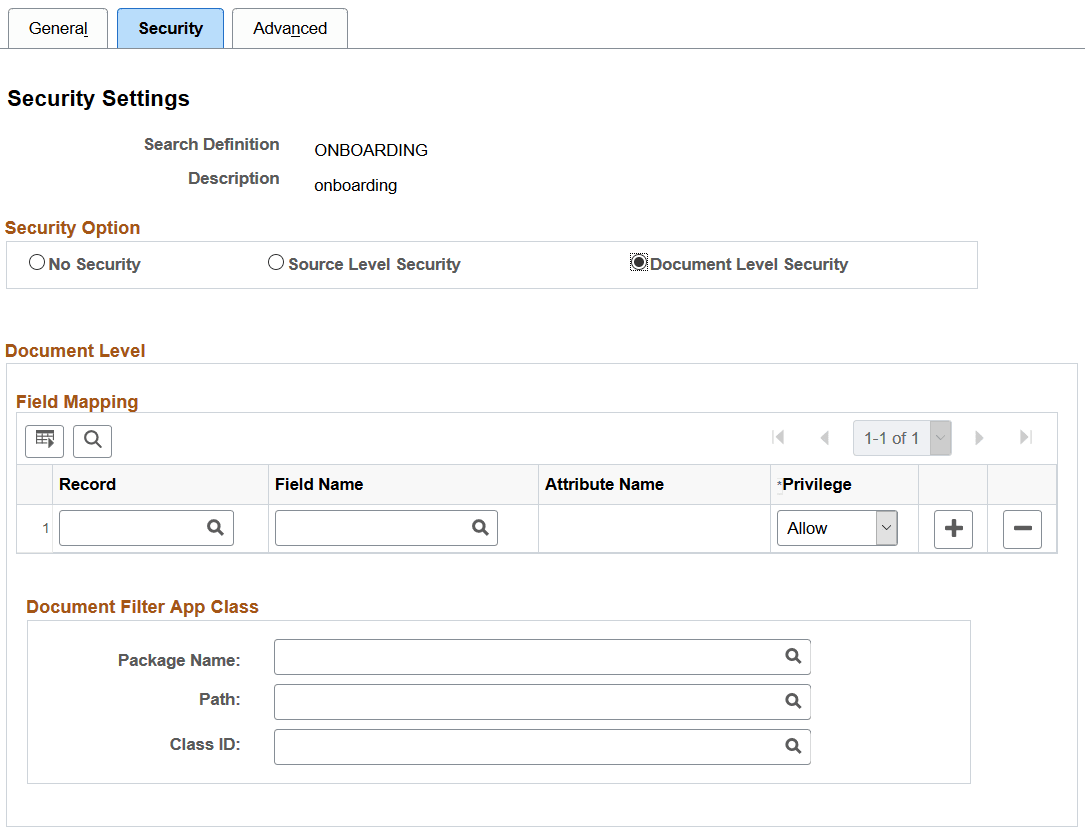
This example illustrates the fields and controls on the Security Settings page - Document Level Security option. You can find definitions for the fields and controls later on this page.
| Field or Control | Description |
|---|---|
|
Record |
Select the name of the record (table) containing the fields you want to use to restrict access. |
|
Field Name |
Select the field that will identify security values and determine access. The selected field becomes the security attribute having the specified privilege. At indexing time, when the crawler inserts application data into the index, the values populating the selected field will carry the specified privilege. |
|
Privilege |
Define the access privilege or restriction.
Note: The privilege of Deny is useful in situations where there are too many values for the security attribute if Allow were selected. For example, rather than enabling access to nine out of ten field values, it is more efficient to deny access only to the one you want to restrict. Note: If multiple attributes appear in the grid the system effectively inserts an AND clause between the items in the grid. |
|
Package Name |
The application class enables you to define and run additional filters and logic against the application data contained in the indexed source fields. The application class needs to be implemented to return the list of allowable values for the configured security attributes in the Field Mapping grid. Select the appropriate application package. |
|
Path |
Select the path pointing to the application class. |
|
Class ID |
Select the appropriate application class. |